New — Bitlite School Portal for the 2026/2027 session: run your whole school from one secure portal. Sign up your school
Bitlite School Portal · Nursery · Primary · Secondary

Run your whole school from one secure portal.

Admissions, attendance, results and report cards, CBT, fees, e-learning, lesson notes, WhatsApp updates to parents and verifiable certificates — on any phone or computer, built for the Nigerian school calendar.

  • 3-term calendar
  • NERDC lesson notes
  • Paystack · Flutterwave · Monnify
  • Multi-campus

2026/2027 Academic Session

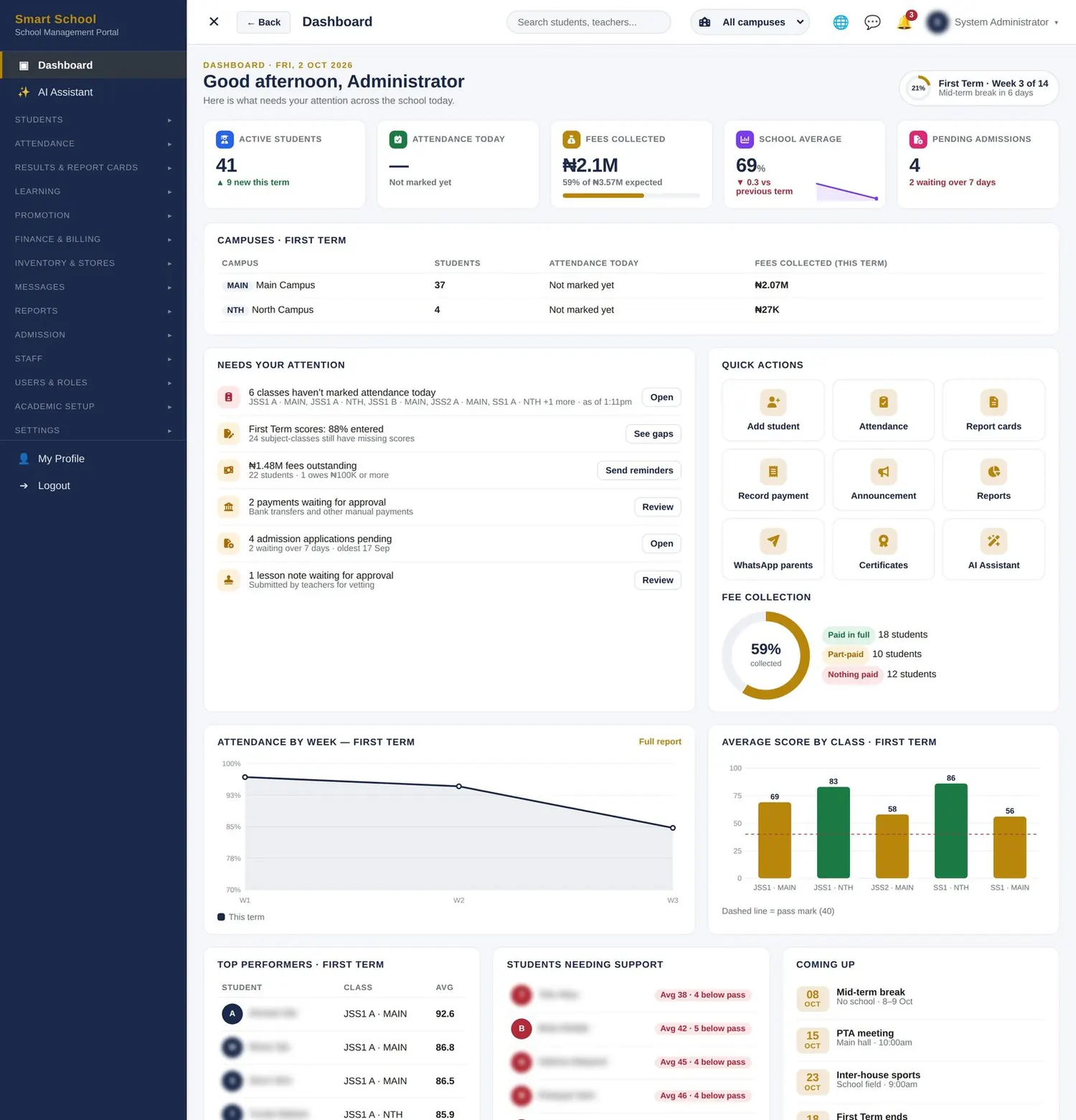
Bitlite School Portal administrator dashboard showing students, attendance, fees and results
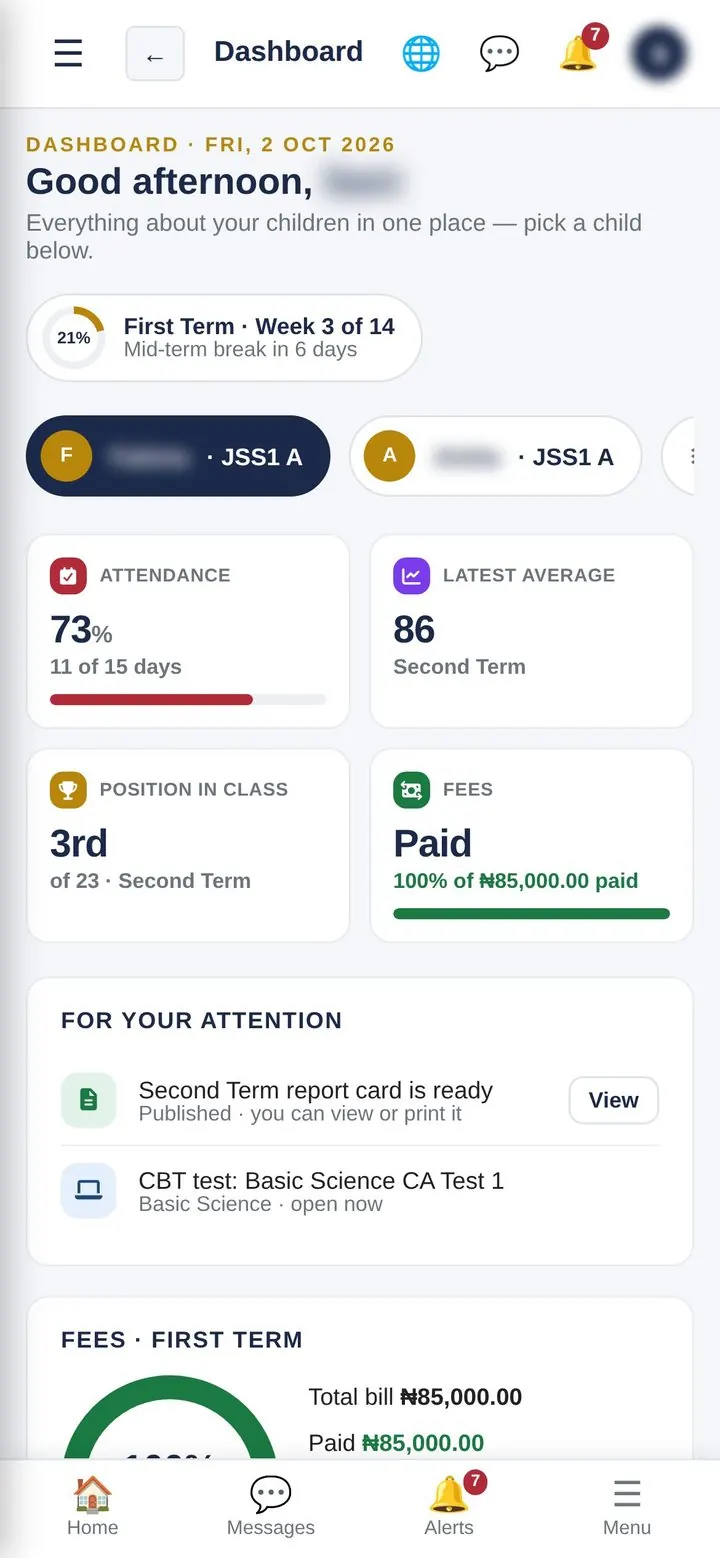
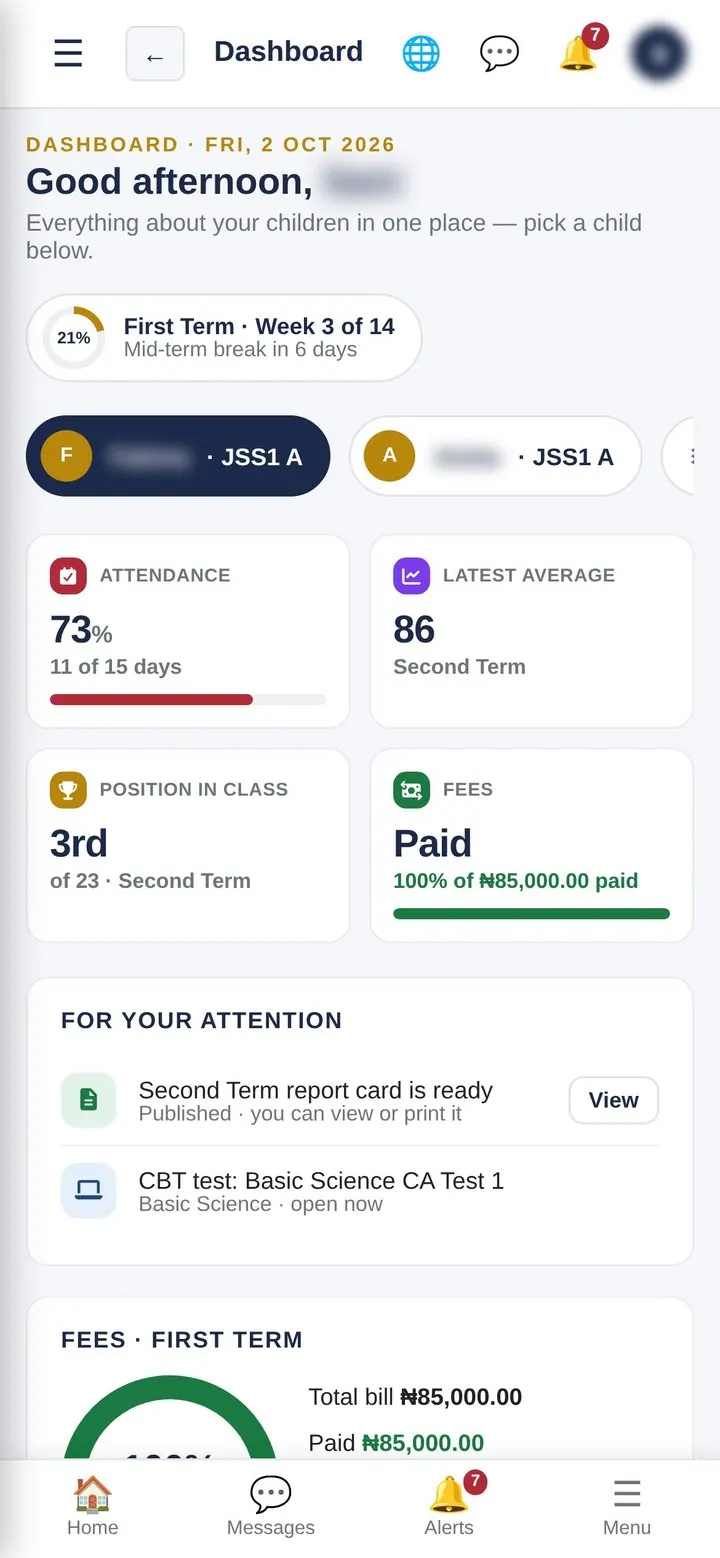
Parent dashboard on a phone

One login each

Admin, teachers, bursar, parents and students — each sees only what their role allows.

Any device

Phone, tablet or computer. Installs on a phone’s home screen like an app.

Built for Nigeria

Three terms, CA and exam split, NERDC lesson-note format, Naira and local gateways.

Keeps improving

New features arrive as updates the school applies in a few clicks.

Why schools switch

Less paperwork, faster results, happier parents.

Most schools don’t lack effort — they lack one place where the work comes together.

Report cards
TodayTyped in Word or Excel over weeks; totals, averages and positions worked out by hand.
With the portalTeachers enter CA and exam scores once. Totals, grades, class positions (ties shared fairly), subject ranks and remarks are calculated instantly and printed in bulk.
Attendance
TodayPaper registers that nobody analyses until there is a problem.
With the portalA whole week marked in one screen. The dashboard flags classes that haven’t marked today; parents can be alerted the same morning.
School fees
TodayBank alerts matched by hand, handwritten receipts, debtors’ lists rebuilt every term.
With the portalBills per class or per student, online payment, automatic receipts and a live ledger of who has paid, part-paid or owes.
Parents
TodayLarge WhatsApp groups, missed notices, endless “please send my child’s result”.
With the portalEach parent sees their own children’s attendance, results and fees, and receives personal notices, reminders and report-card links.
Exams & tests
TodayPrinting, invigilating and marking objective papers.
With the portalComputer-based tests from a reusable question bank — timed, shuffled and marked automatically.
Lesson notes
TodayPaper notes submitted late and vetted even later.
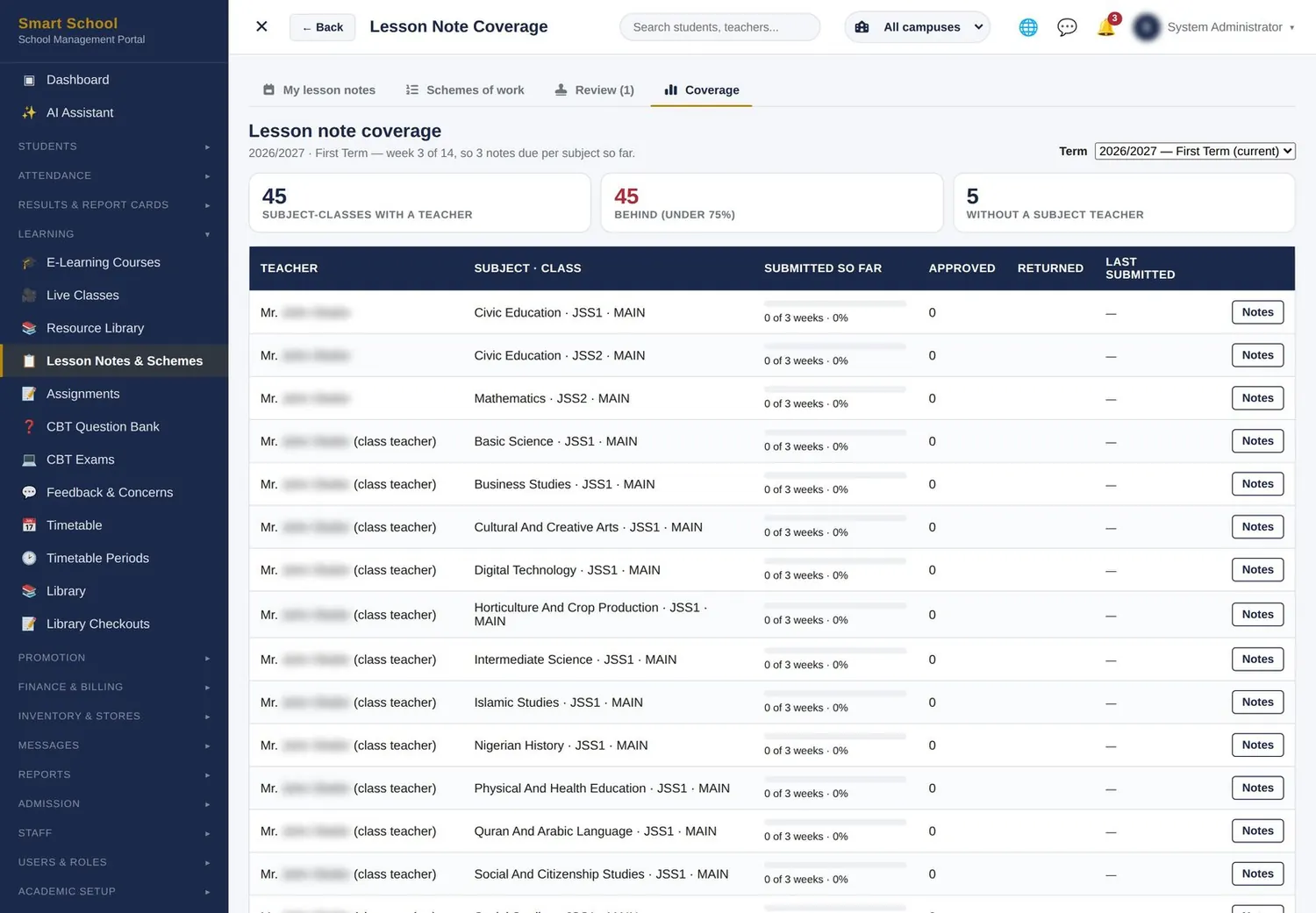
With the portalNotes written from the scheme of work, approved or returned with comments, and a coverage report for every teacher.
Certificates
TodayEasy to forge; employers phone the school to confirm.
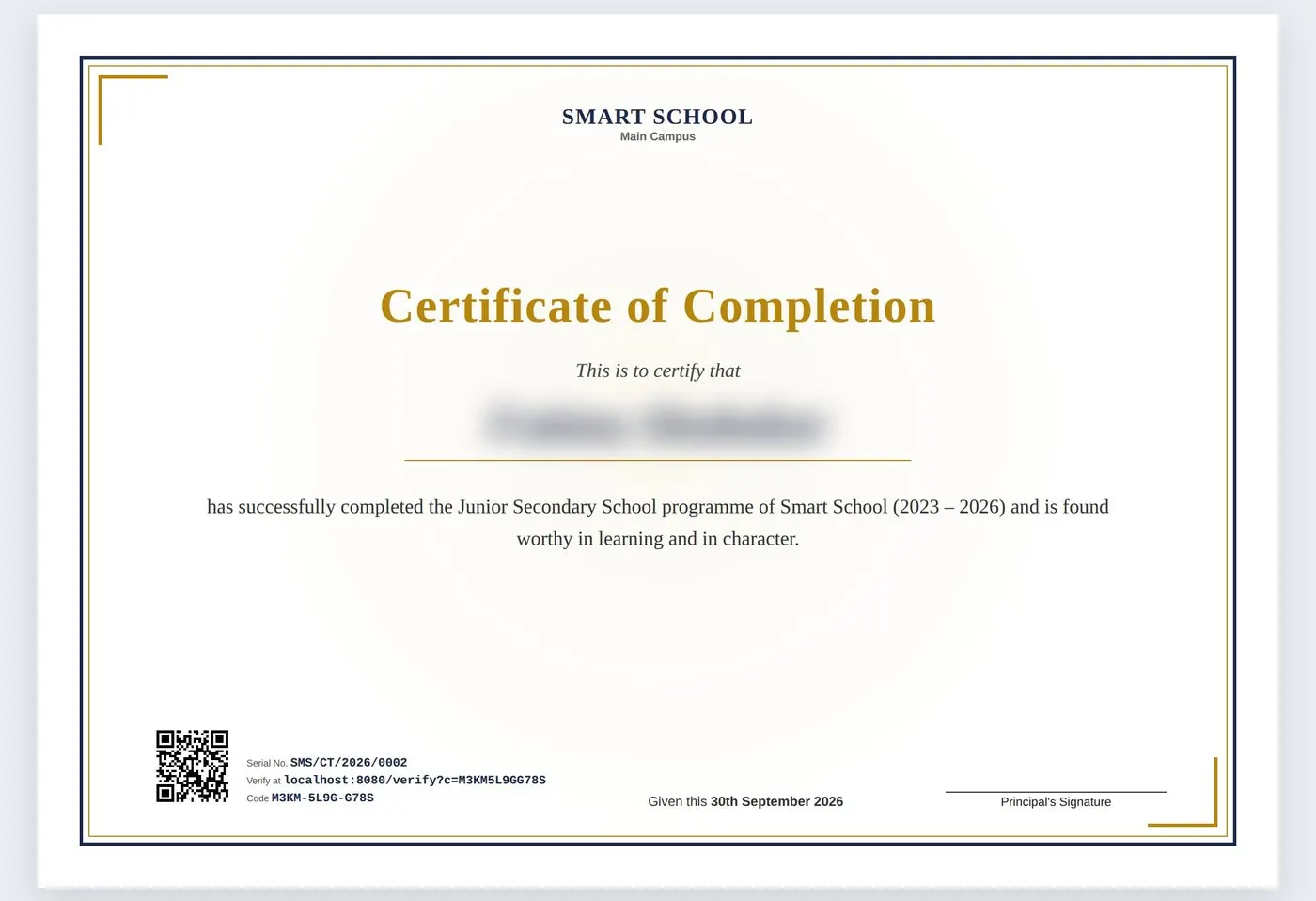
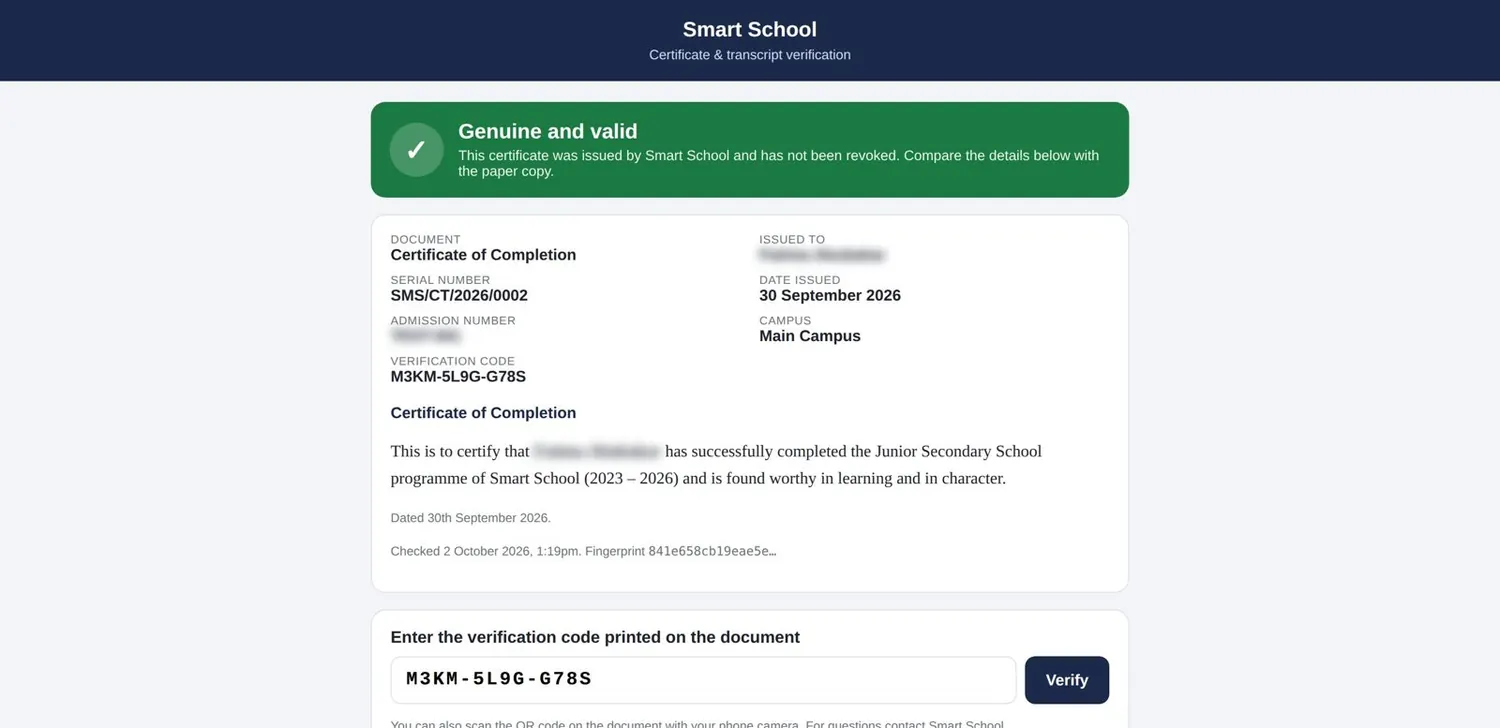
With the portalEvery certificate and transcript carries a serial number and a QR code anyone can scan to confirm it is genuine.
One portal, every role

Everyone gets their own view — and only their own view.

Each person opens the portal to their own to-do list: what they need to act on today, and nothing that isn’t theirs.

Proprietor & admin

Whole-school picture, approvals, settings, staff accounts and permissions, reports and exports.

The administrator’s dashboard opens on what needs attention today: classes without attendance, missing scores, outstanding fees, payments awaiting approval, pending admissions and lesson notes waiting to be vetted.

See the features
Proprietor & admin dashboard

Teachers

Their classes only by default: attendance, scores, lesson notes, assignments, CBT and e-learning.

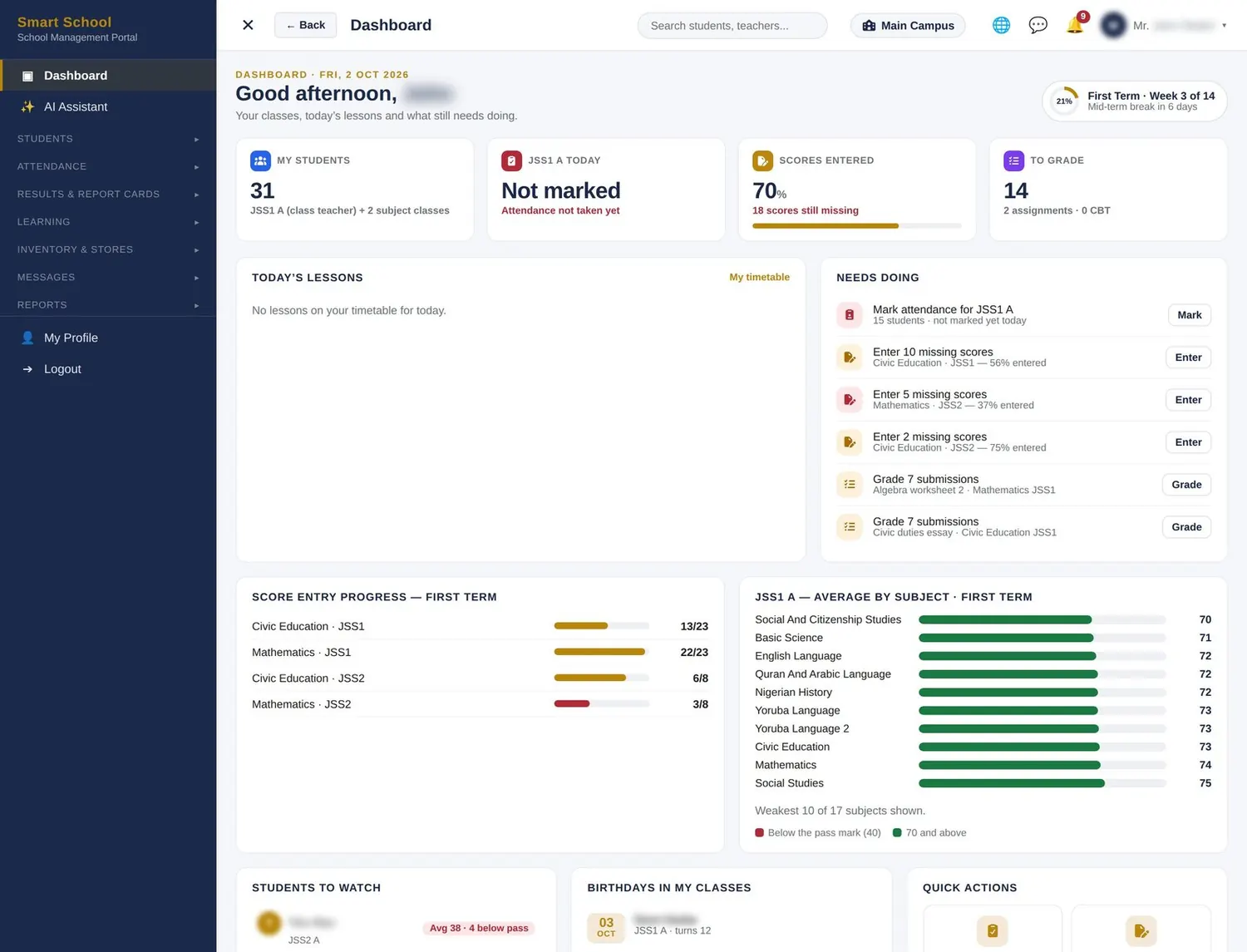
Students in their classes, today’s lessons, attendance still to mark, scores still missing per subject, submissions to grade and students to watch.

See the features
Teachers dashboard

Bursar

Bills, payments, approvals, receipts, debtors and daily collections — nothing else.

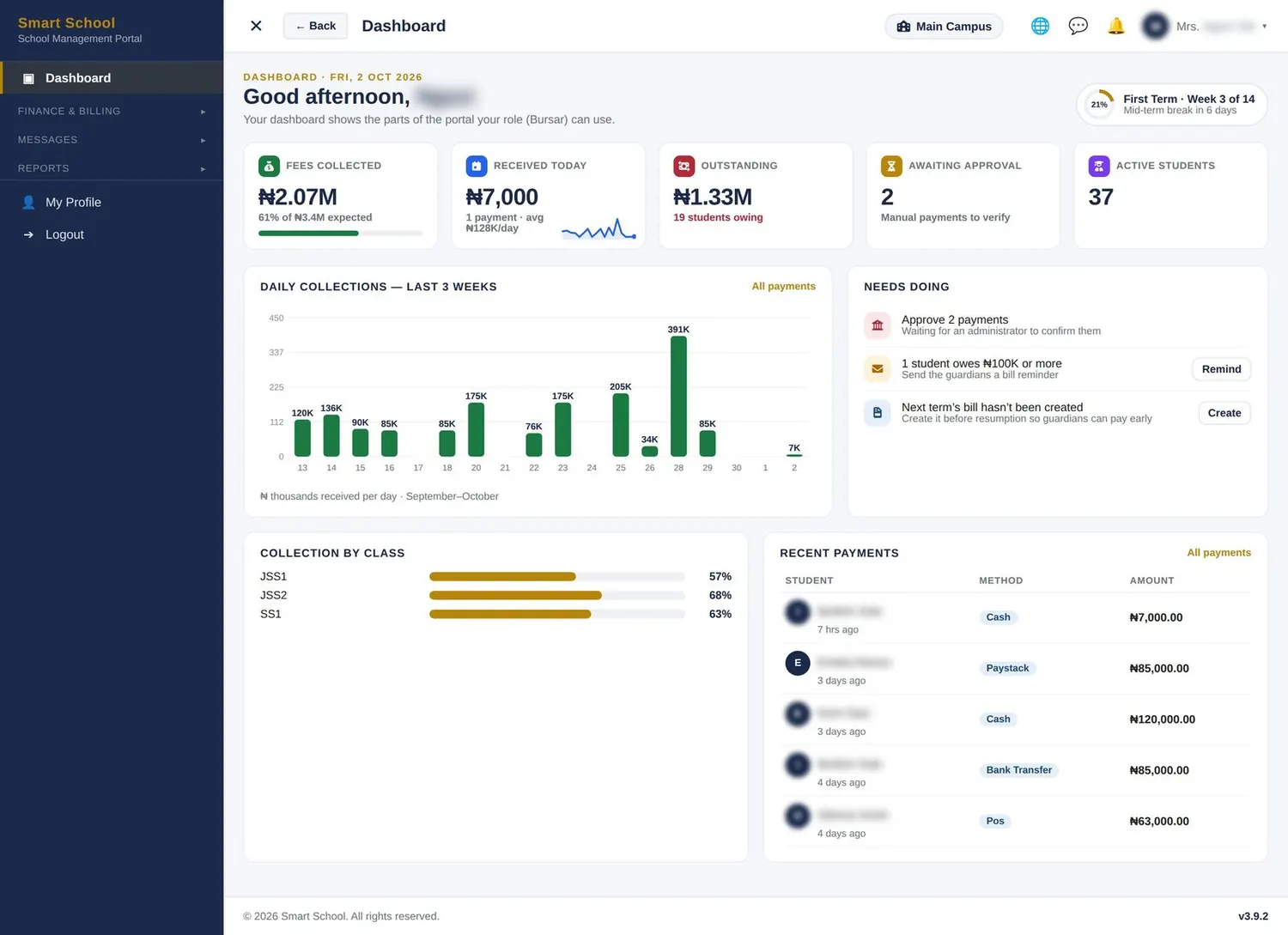
Collected, received today, outstanding, payments awaiting approval, daily collections chart and collection rate by class.

See the features
Bursar dashboard

Parents

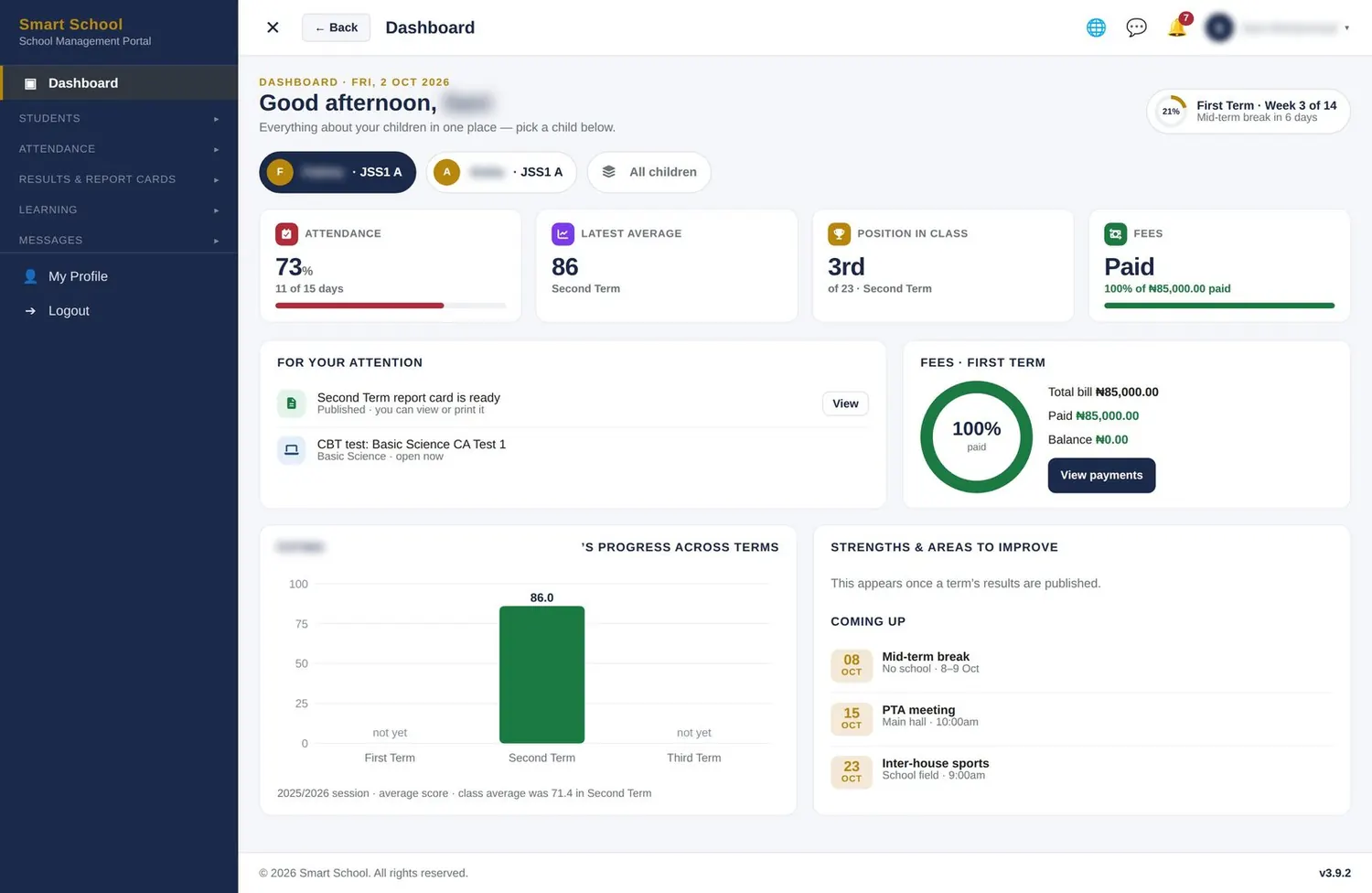
Each child’s attendance, results, report cards, fees and online payment, with notices from school.

Switch between children. Attendance, latest average, position in class, fees paid, report-card alerts and the school calendar.

See the features
Parents dashboard

Students

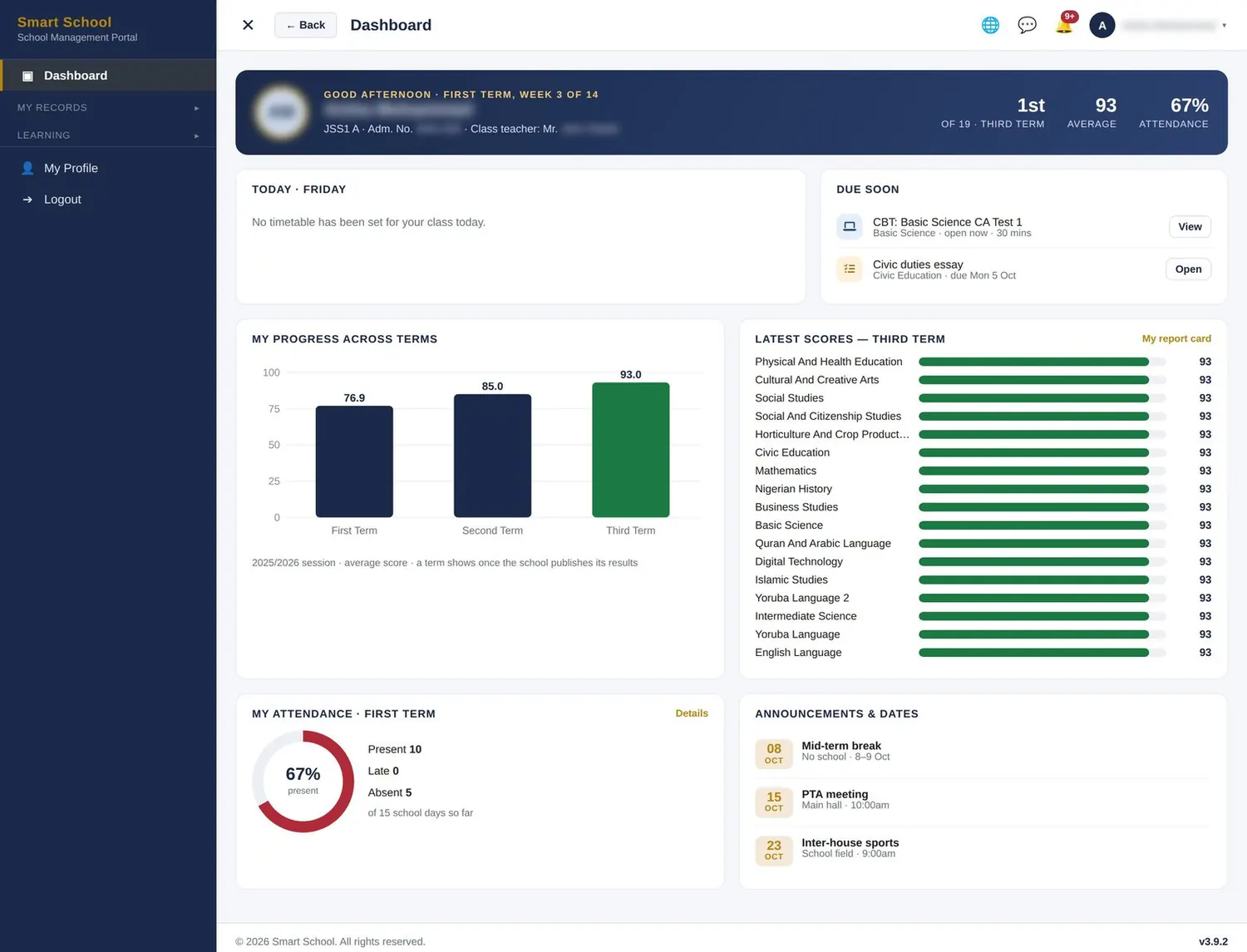
Timetable, assignments, CBT tests, courses, live classes, their progress and report card.

Position, average and attendance at a glance, today’s timetable, tests and assignments due, and progress across terms.

See the features
Students dashboard

Custom roles

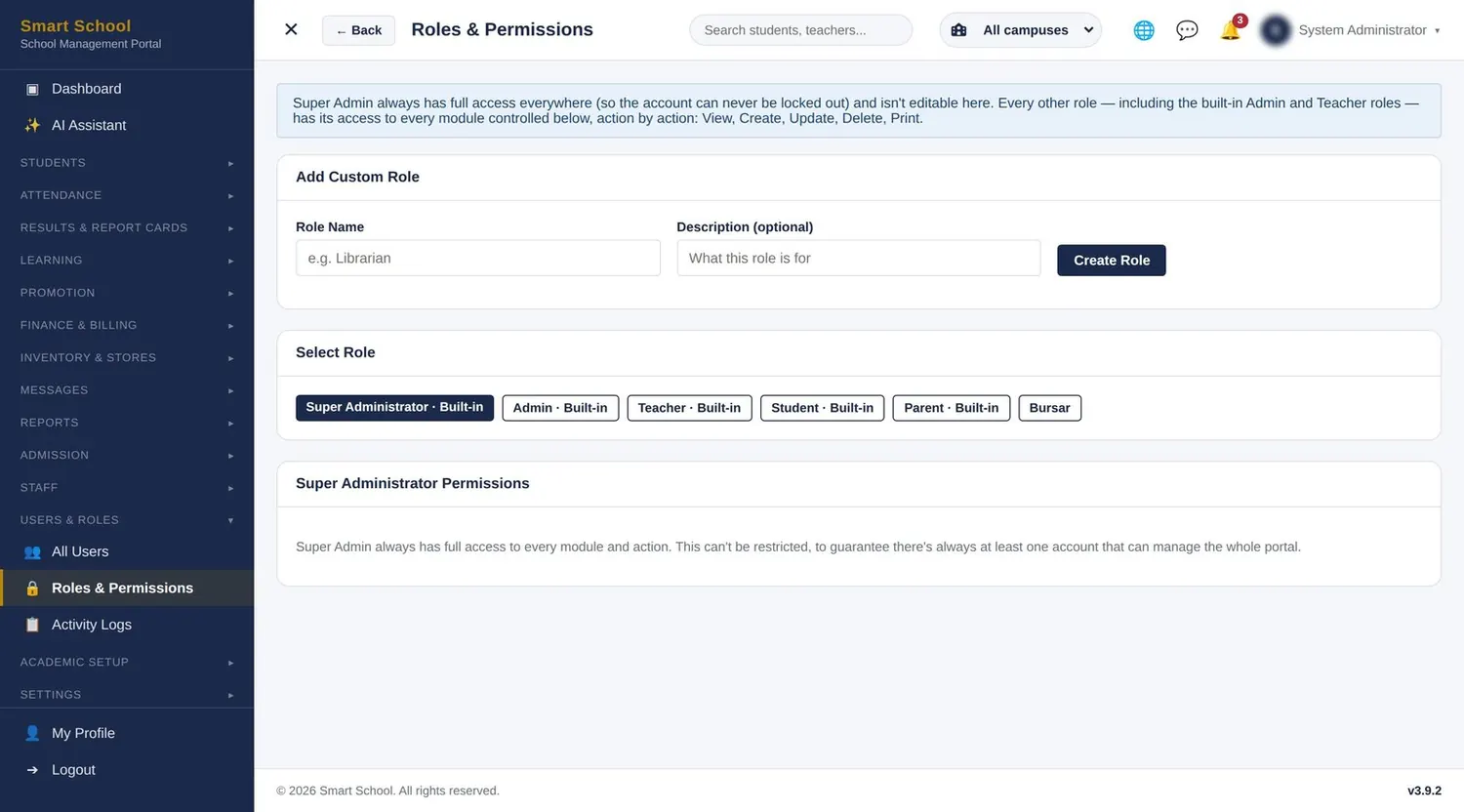
Create roles such as Librarian or Exam Officer and tick exactly what each may view, create, edit, delete or print.

Built-in and custom roles, each with view, create, update, delete and print rights per module.

See the features
Custom roles dashboard
Everything in one portal

Explore the portal, module by module

Real screens from a live installation — names and personal details are blurred to protect privacy.

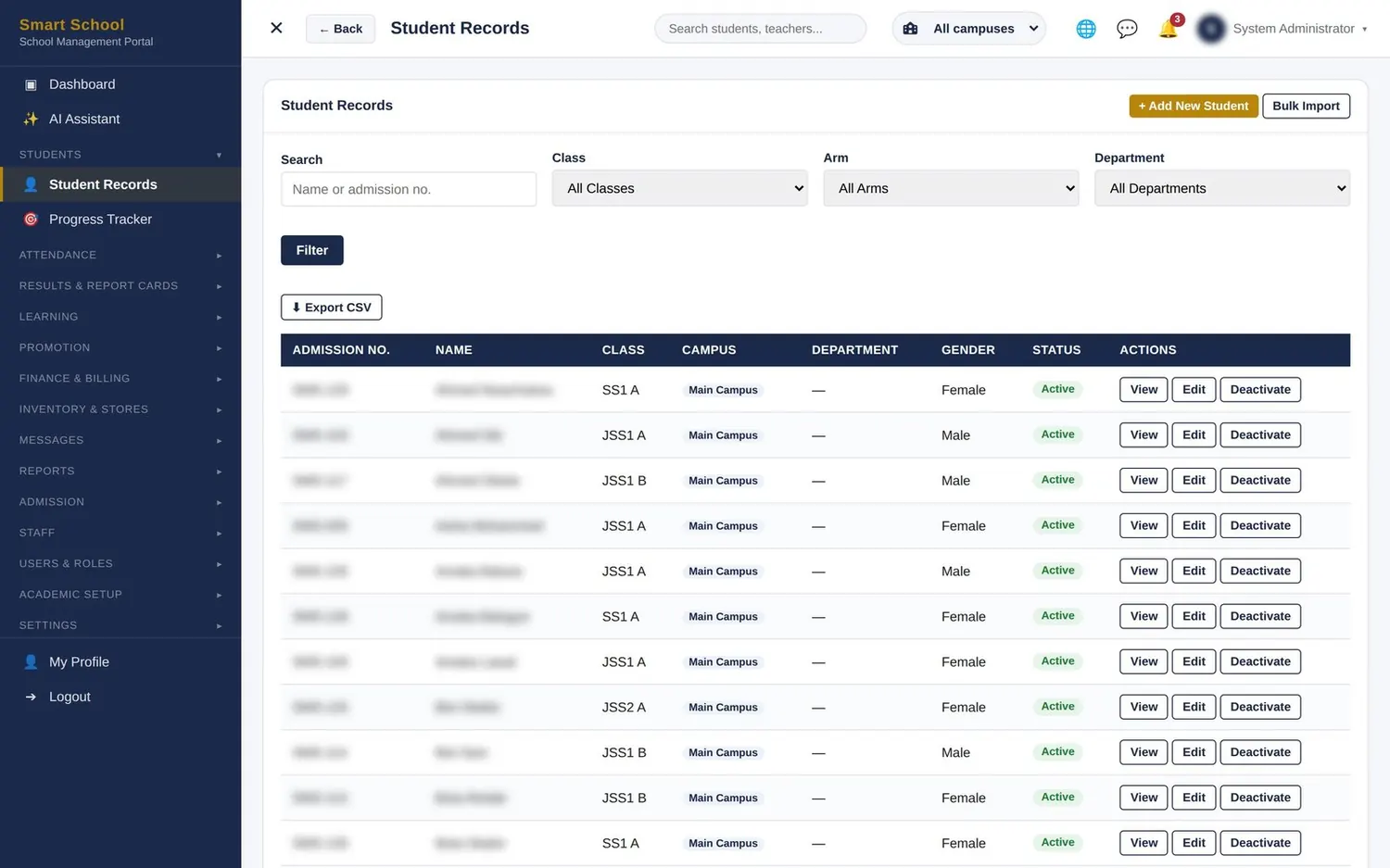
Admissions & student records screen
Admissions & student records second view
Academics

Admissions & student records

From first enquiry to graduation, one record per child.

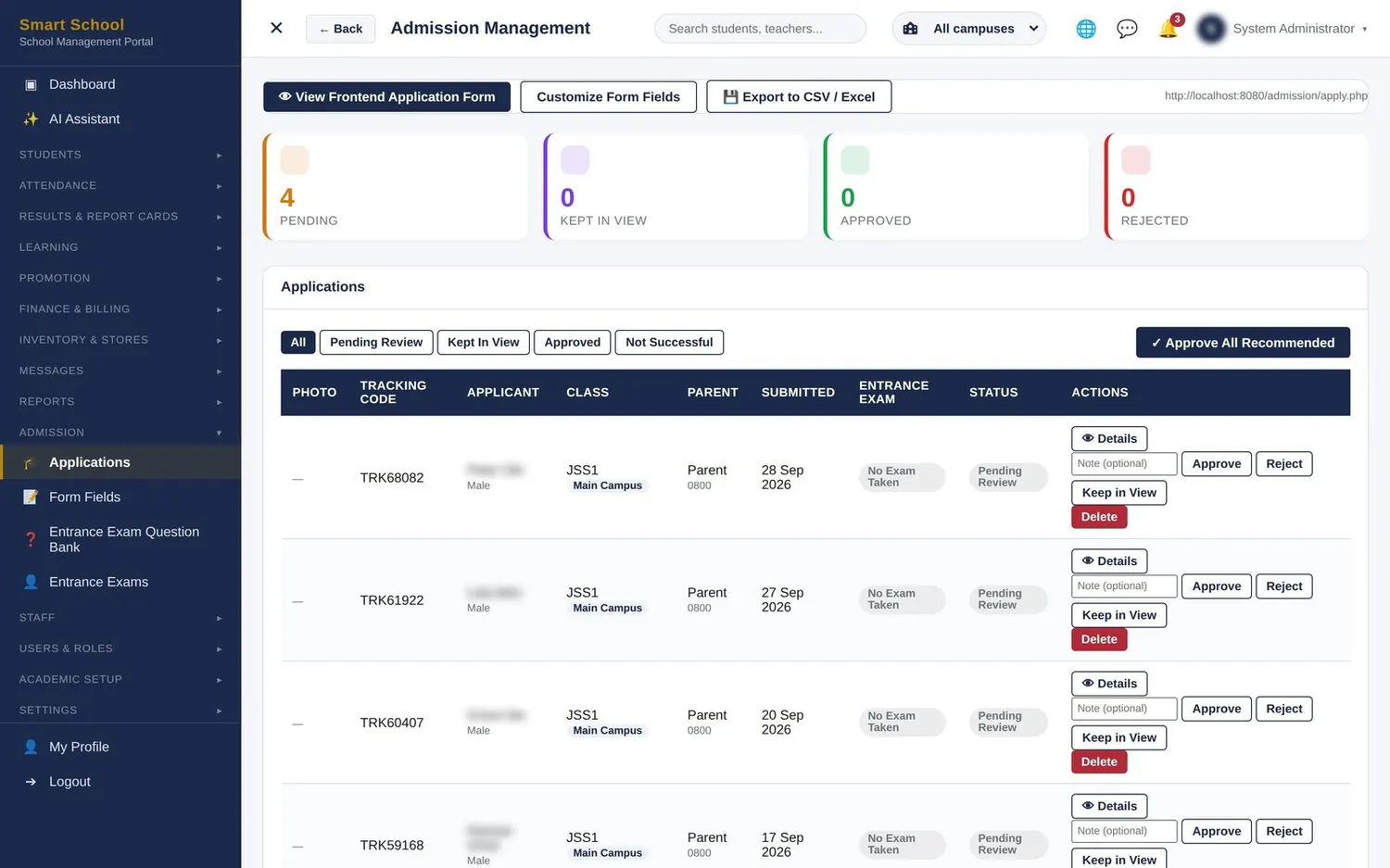
  • Online application form on your website with the fields you choose; applicants get a tracking code
  • Entrance exams online from your own question bank
  • Approve, keep in view or reject — then enrol successful applicants in one click
  • Complete student records: photo, class, department, guardian details and logins
  • Bulk import from a spreadsheet; export any list at any time
  • ID cards and end-of-session promotion with a suggested promote-or-repeat
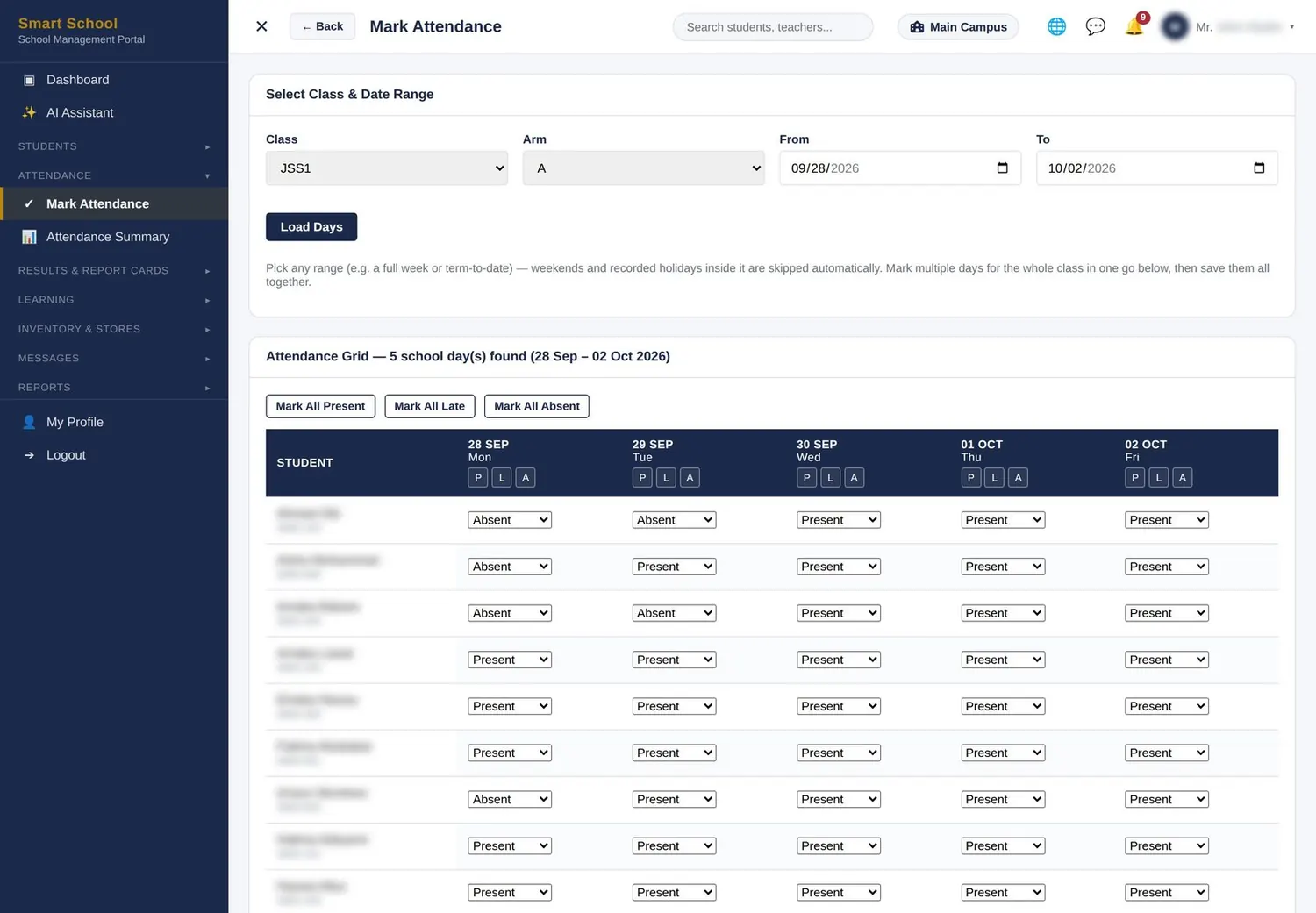
Attendance & timetable screen
Attendance & timetable second view
Academics

Attendance & timetable

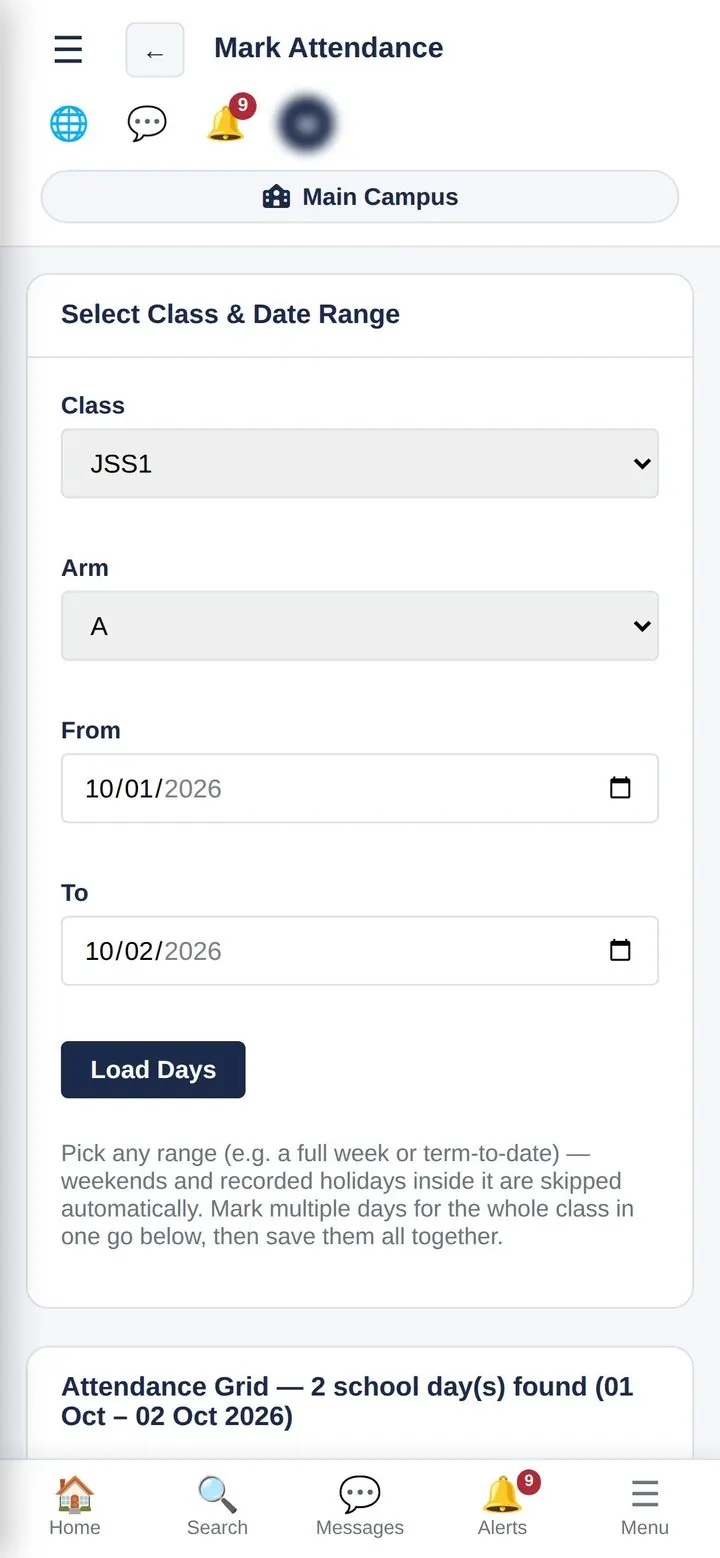
A full week’s register in one screen.

  • Mark Present, Late or Absent for every day at once, with one-tap “mark all”
  • Weekends and school holidays are skipped automatically
  • The dashboard lists every class that hasn’t marked attendance today
  • Absence alerts go to parents on WhatsApp the same morning
  • Class timetables show today’s lessons on student and teacher dashboards
Results & report cards screen
Results & report cards second view
Academics

Results & report cards

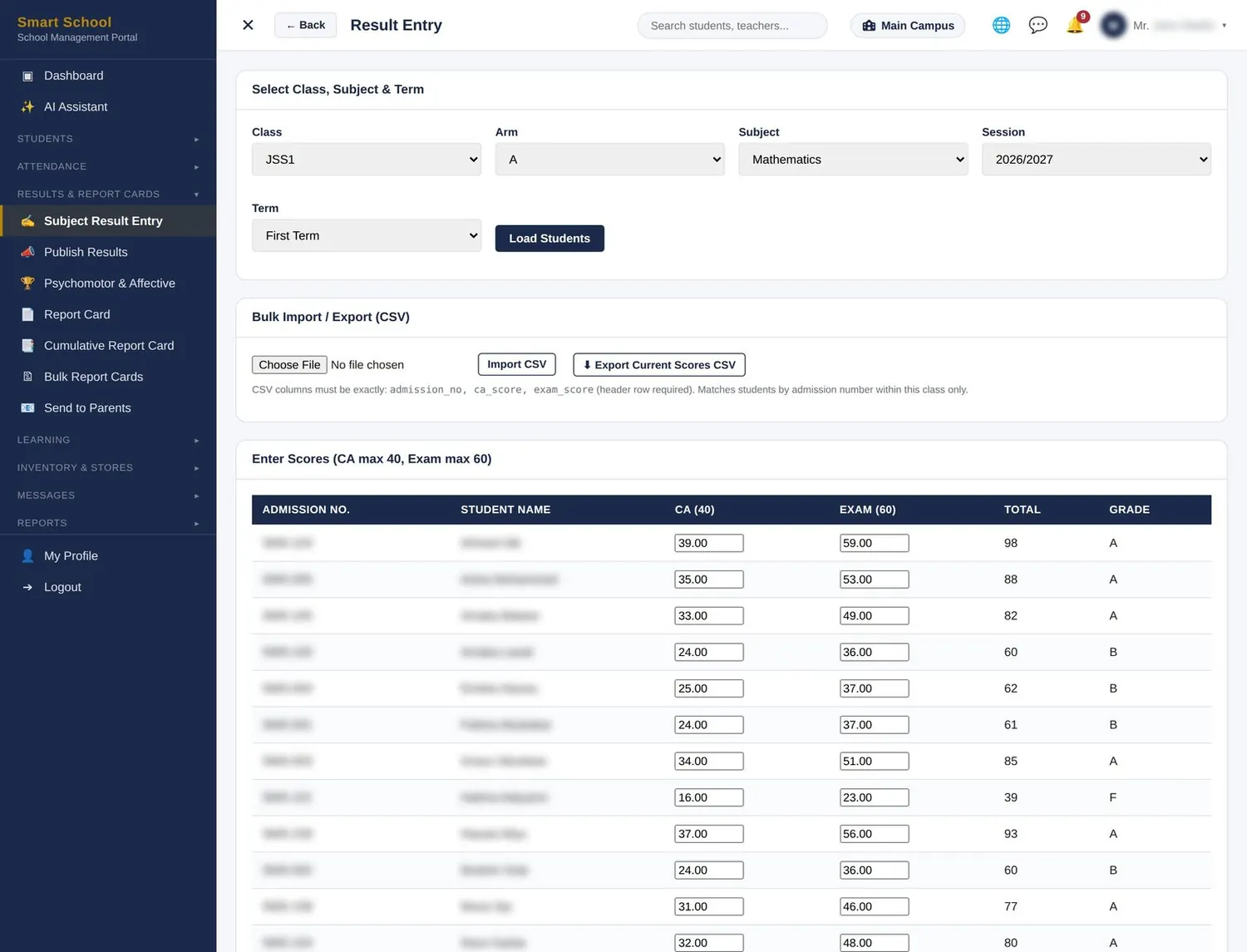
Scores in once. Report cards out in minutes.

  • Scores per class, arm and subject — typed in or uploaded from a CSV
  • Your CA and exam weighting, grading scale and remarks set once for the school
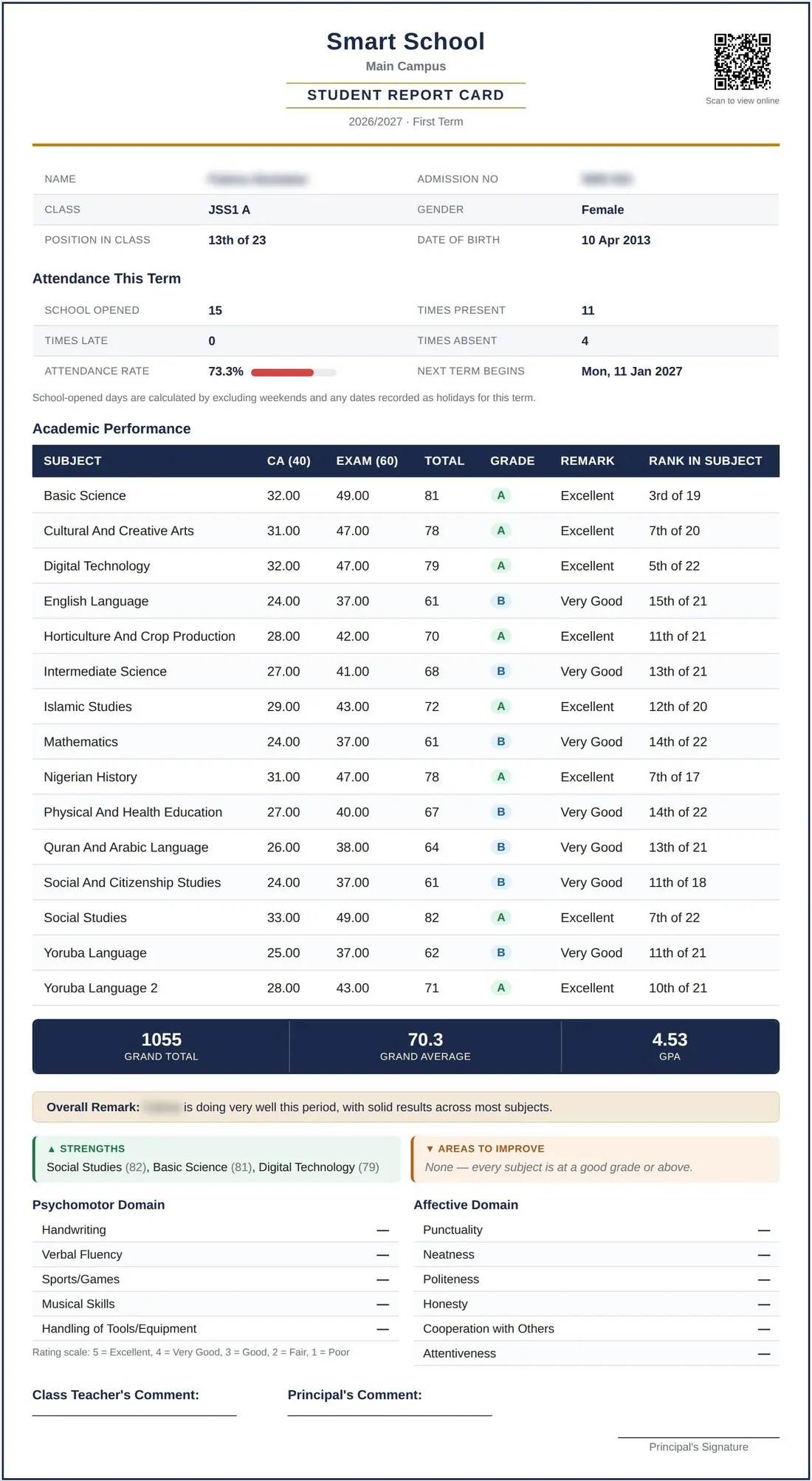
  • Class and subject positions done right — tied students share the same position
  • Psychomotor and affective ratings, with teacher and principal comments
  • Term and cumulative report cards, printed one at a time or in bulk
  • Sent to parents by email or a no-login WhatsApp link once published
Results control & analysis screen
Academics

Results control & analysis

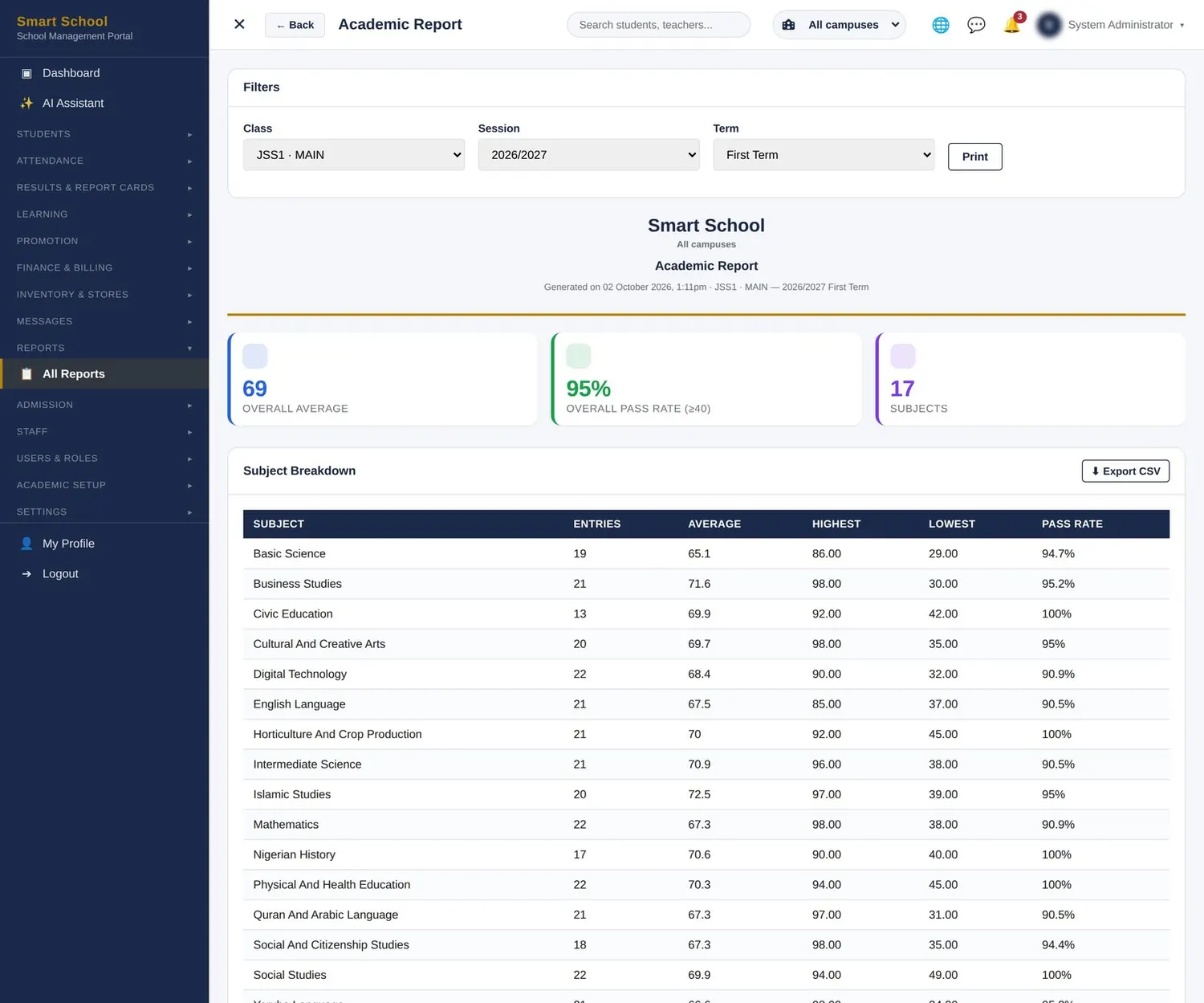
You decide when results go out — and you see the story behind them.

  • Scores stay hidden from students and parents until management publishes them
  • Bulk publish for several classes at once, with a warning for missing scores
  • Score-entry progress per subject and class, so you know who is behind
  • Academic report: average, pass rate, highest and lowest per subject
  • Cumulative results across all three terms, exportable to CSV or Excel
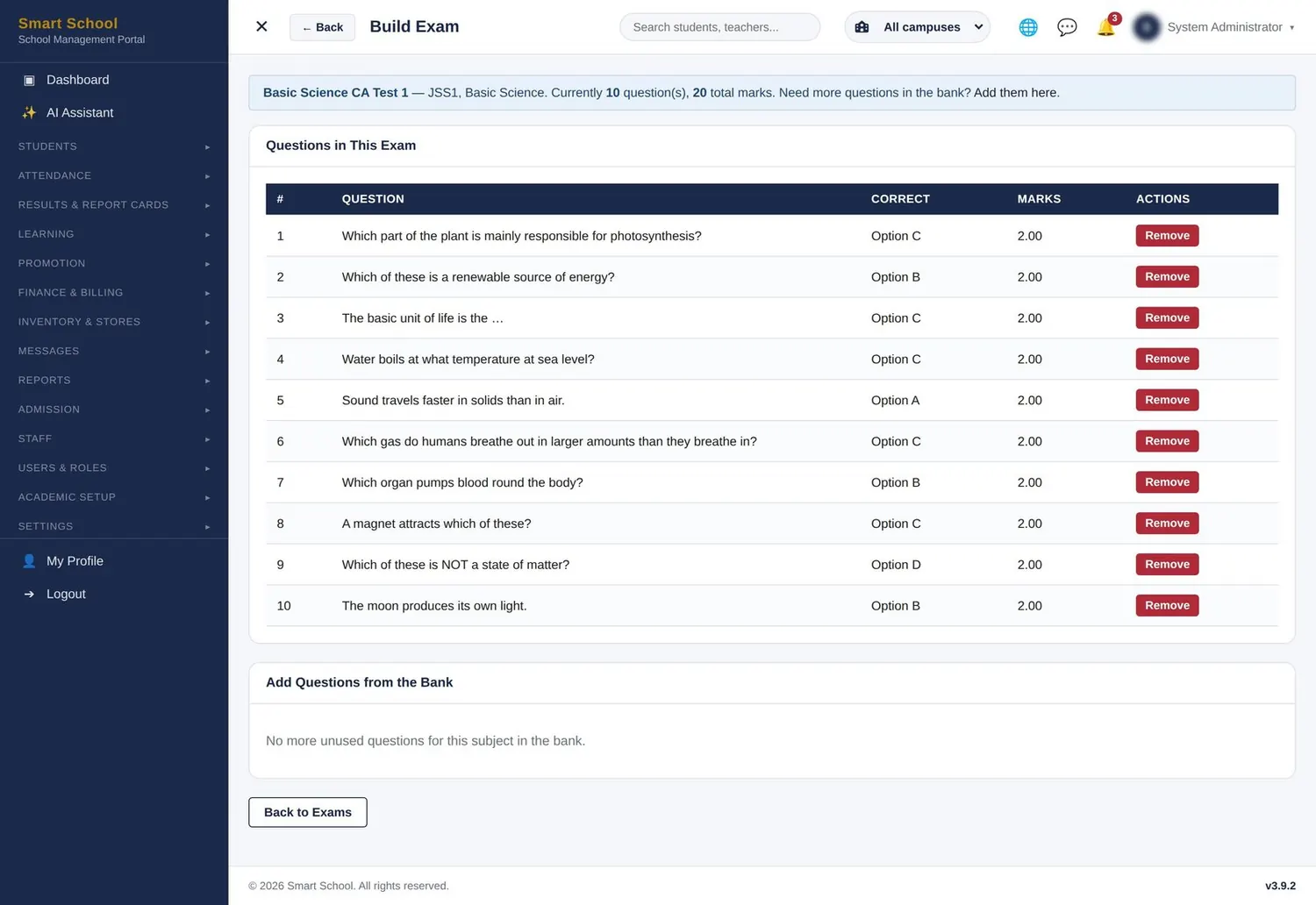
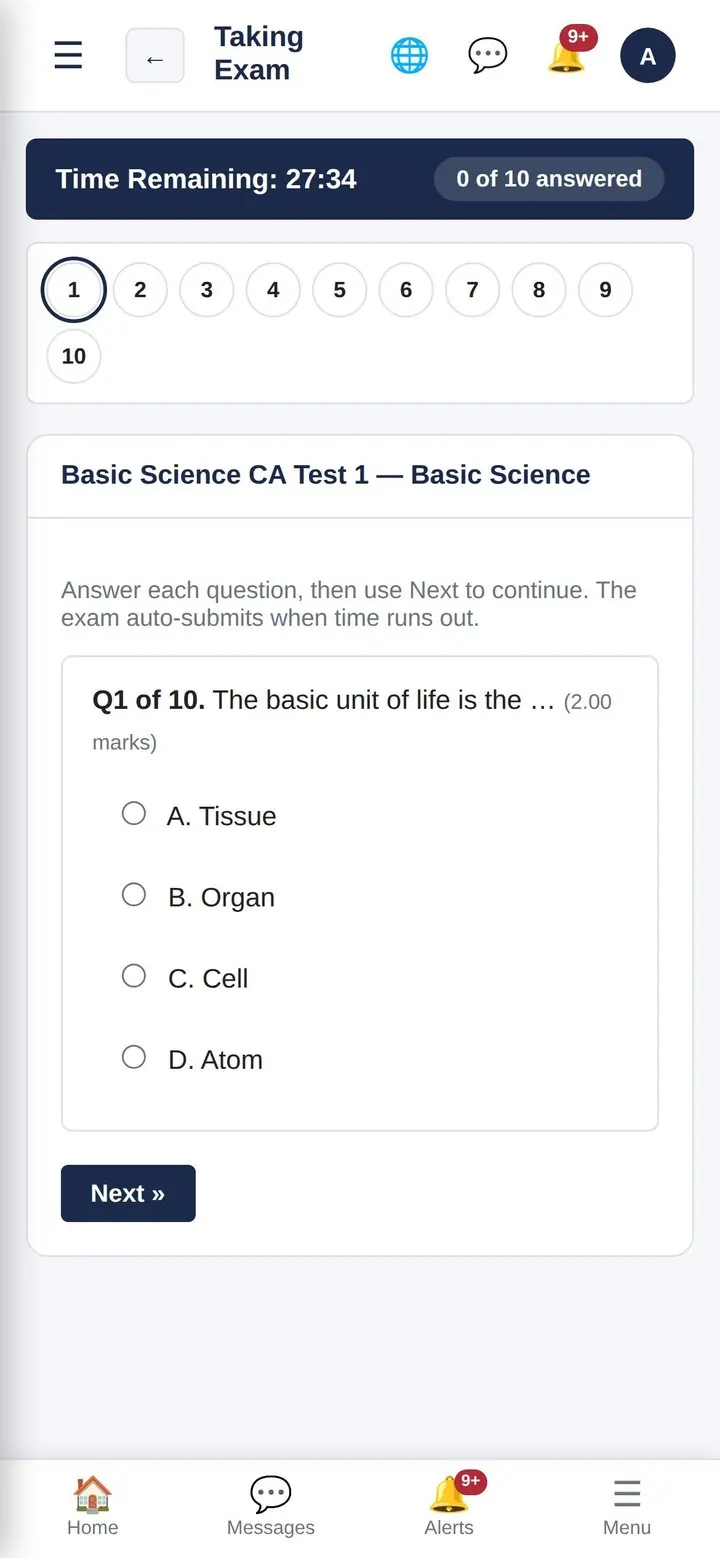
CBT examinations screen
CBT examinations second view
Academics

CBT examinations

Computer-based tests that set, time and mark themselves.

  • Build a question bank once per subject and reuse it every term
  • Timed, shuffled tests that submit themselves when time runs out
  • Six question types — multiple choice, true/false, multiple response, fill-in-the-blank, short answer and essay
  • Objective answers marked instantly; written ones go to manual grading
  • Entrance exams for new applicants run the same way
  • AI-drafted questions can be reviewed and added in one click
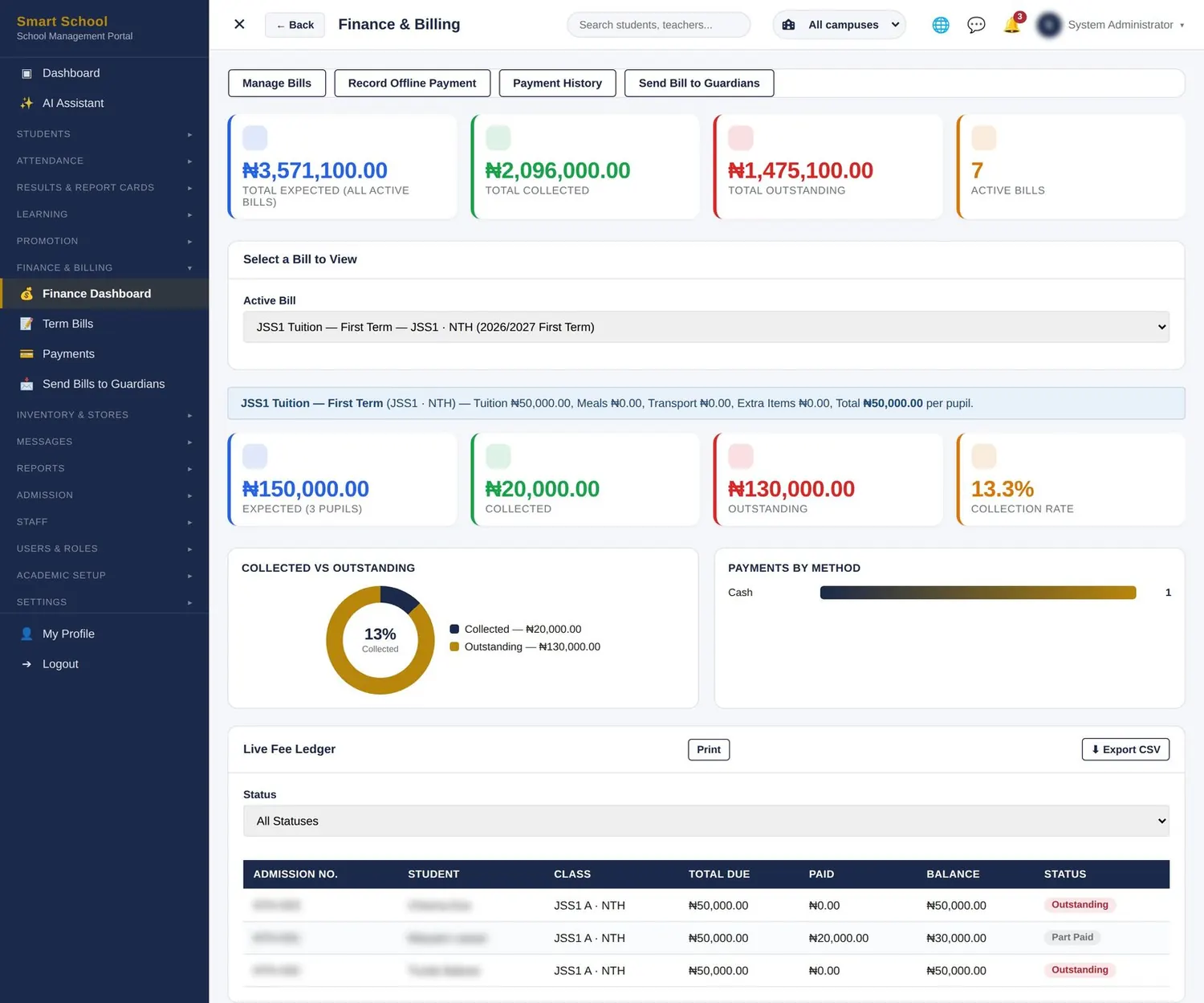
Fees, billing & finance screen
Finance

Fees, billing & finance

Know exactly who has paid, who owes and how much — today.

  • Create the term’s bills once — class bills and special bills for selected students
  • Live ledger, collection rate per bill and payments by method
  • Offline payments by cash, transfer, POS or card, with optional second-admin approval
  • Debtors at a click, with WhatsApp fee reminders to parents
  • Print or export the ledger at any time
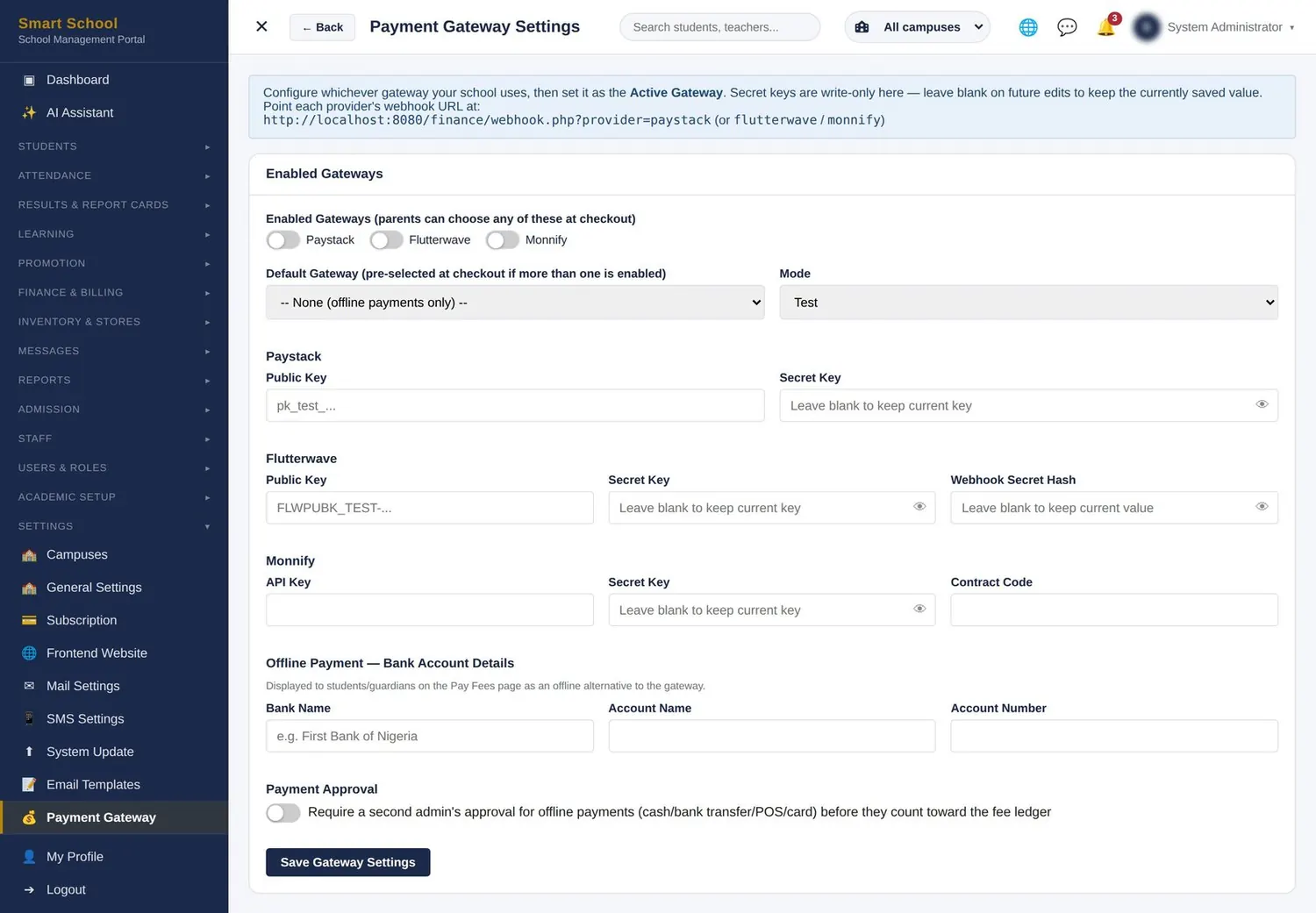
Online payments & receipts screen
Online payments & receipts second view
Finance

Online payments & receipts

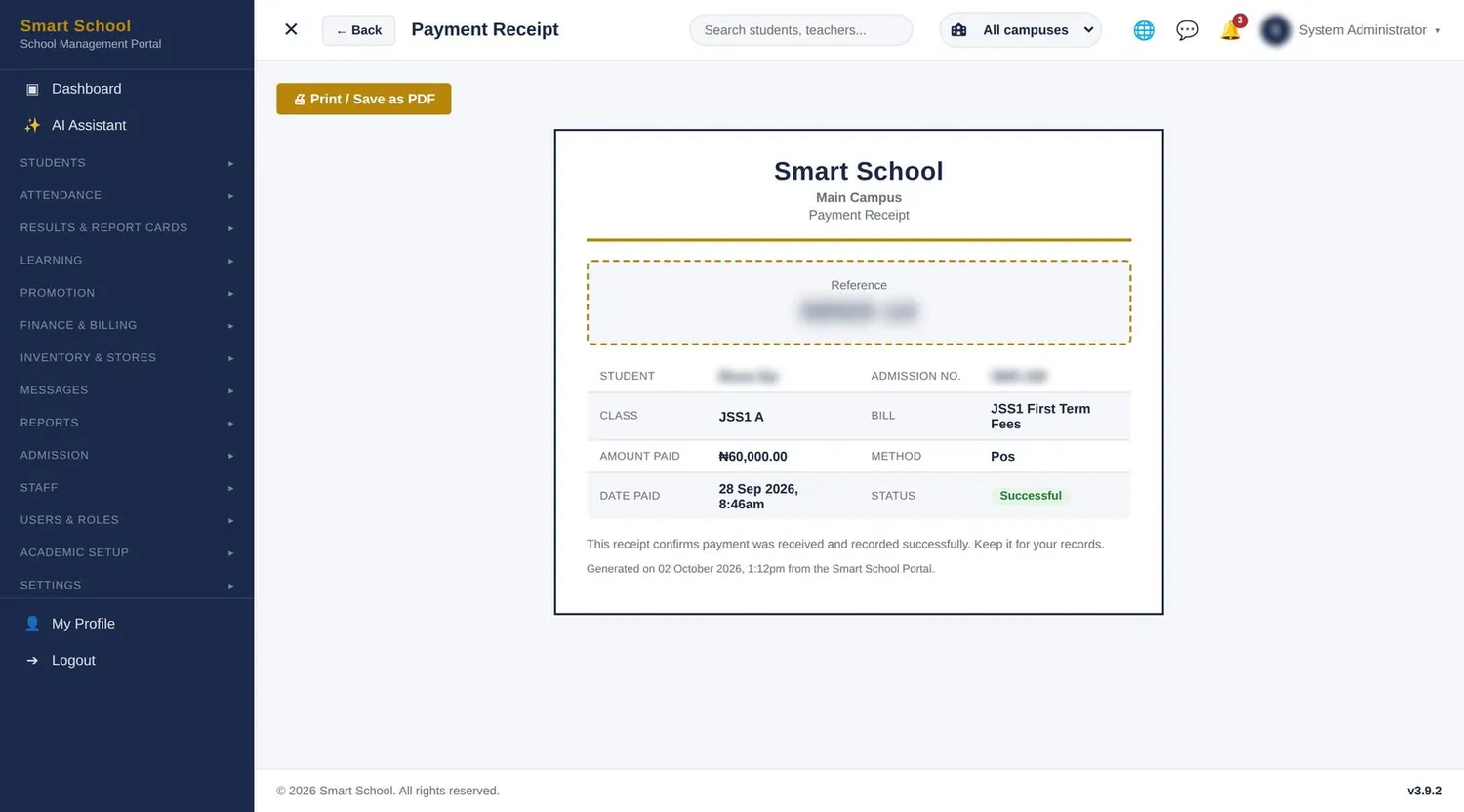
Parents pay from their phones. Receipts write themselves.

  • Connect your own Paystack, Flutterwave or Monnify account — money goes straight to the school
  • Card, bank transfer or USSD through the gateway you switch on
  • Automatic confirmation: no one matches bank alerts by hand
  • Branded receipts to print or save as PDF
  • Manual payments still welcome, with optional second approval
E-learning & live classes screen
E-learning & live classes second view
Learning

E-learning & live classes

Teaching that continues outside the classroom.

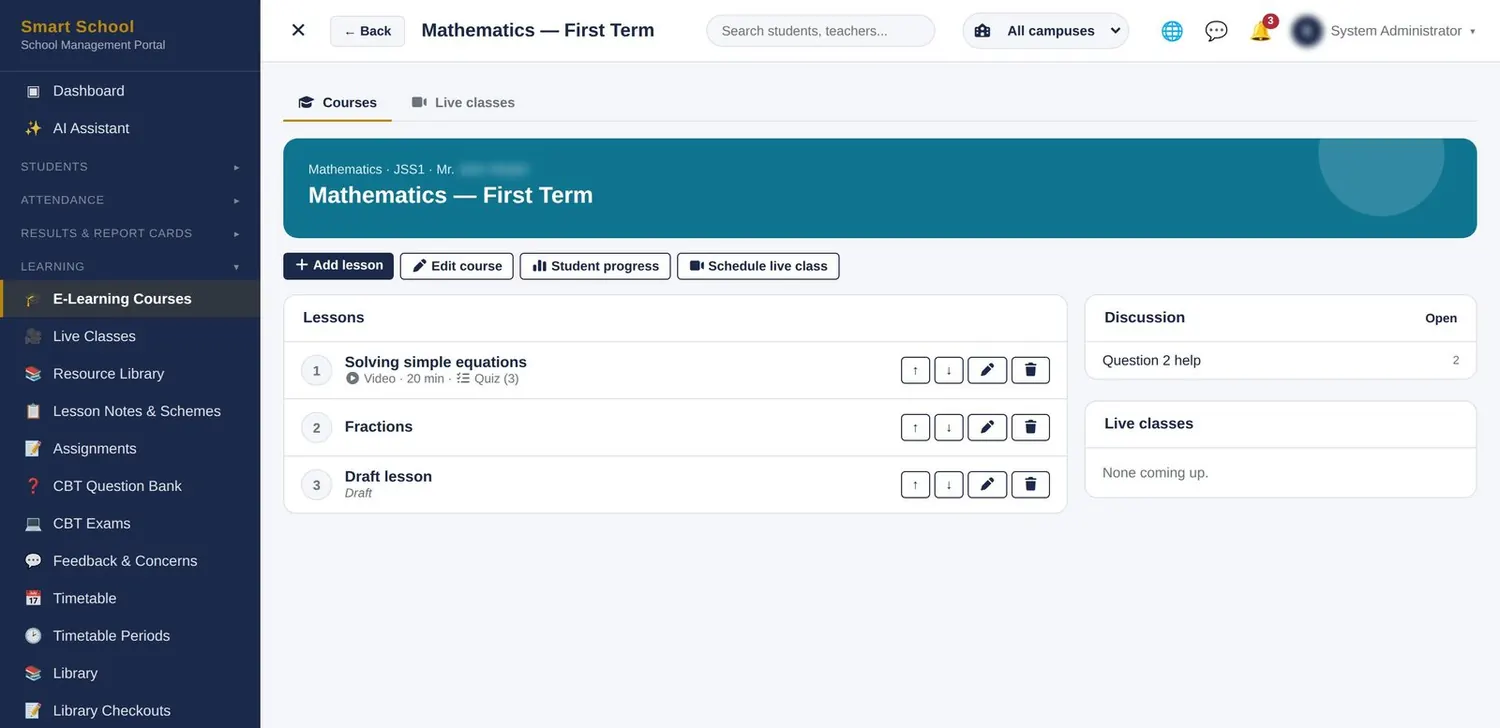
  • Ordered lessons with video, notes and quizzes; drafts stay private until ready
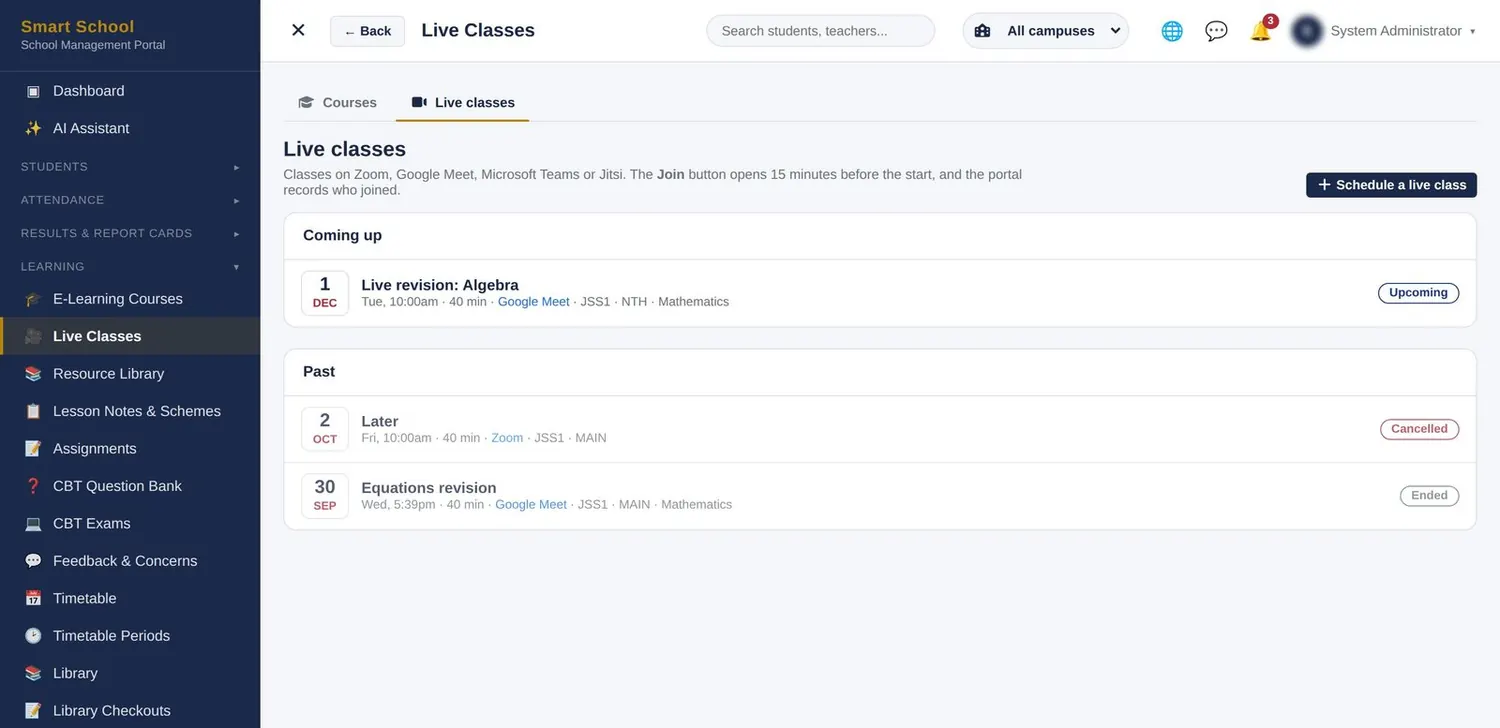
  • Live classes on Zoom, Google Meet, Microsoft Teams or Jitsi
  • Quizzes are scored automatically and feed each student’s progress
  • The portal records who attended every live class
  • Discussion board per course and a student-progress view
Lesson notes & schemes of work screen
Lesson notes & schemes of work second view
Learning

Lesson notes & schemes of work

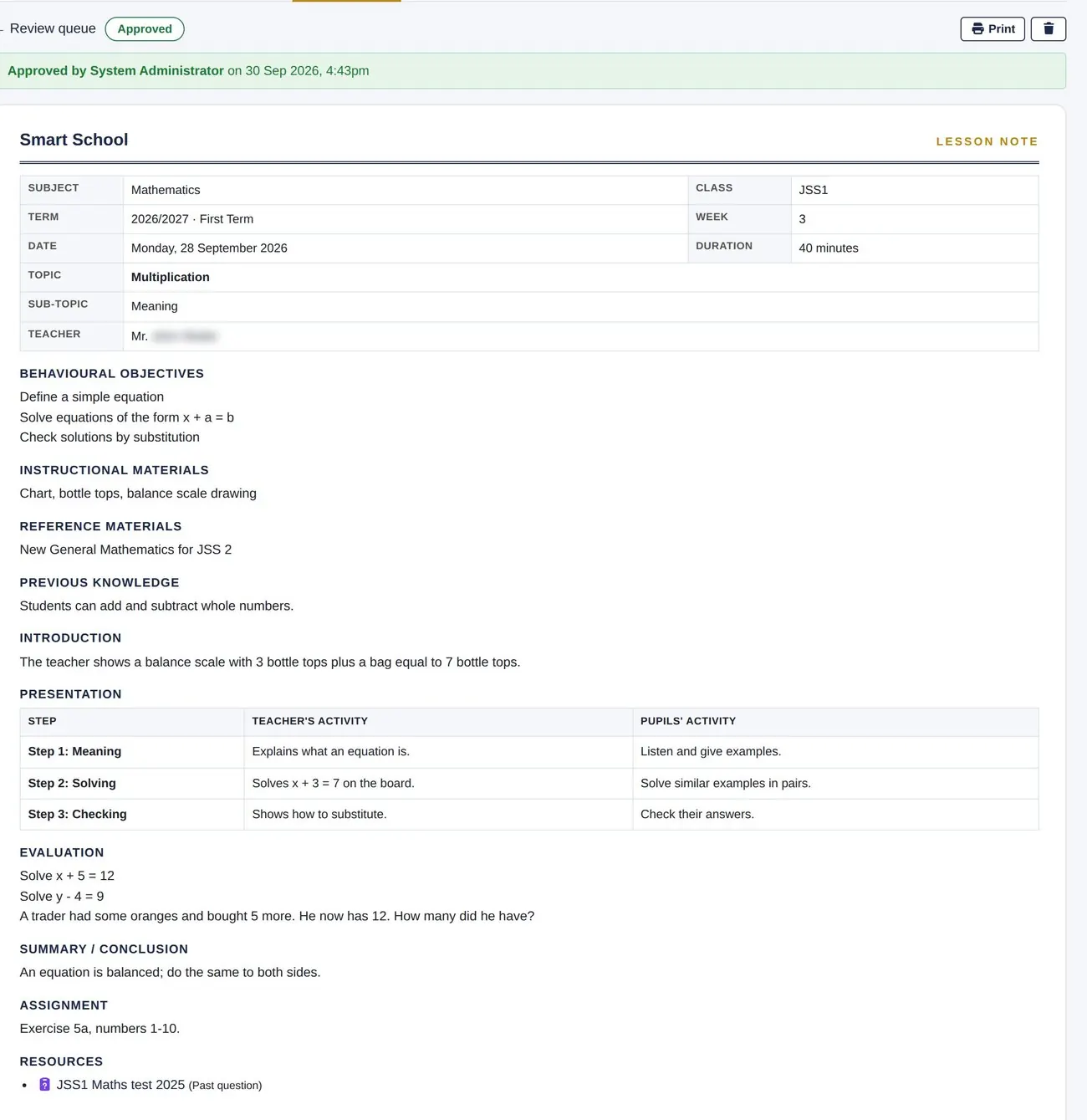
Lesson notes written, vetted and tracked — without the paper chase.

  • Plan from the scheme of work and write notes in the familiar NERDC format
  • Principal or HOD approves or returns each note with comments
  • Coverage report of notes due, submitted, approved and returned per teacher
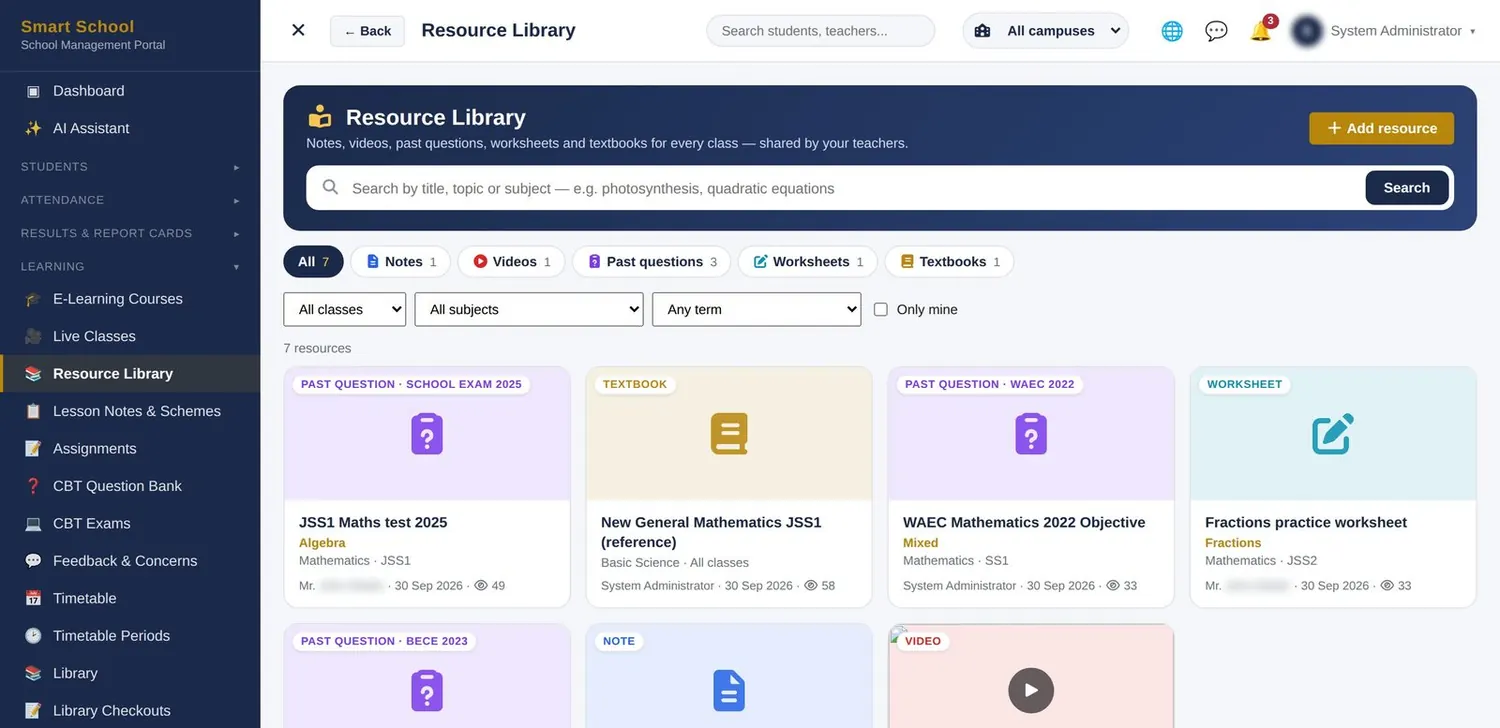
  • Attach resources from the school library
  • Print-ready with signature lines
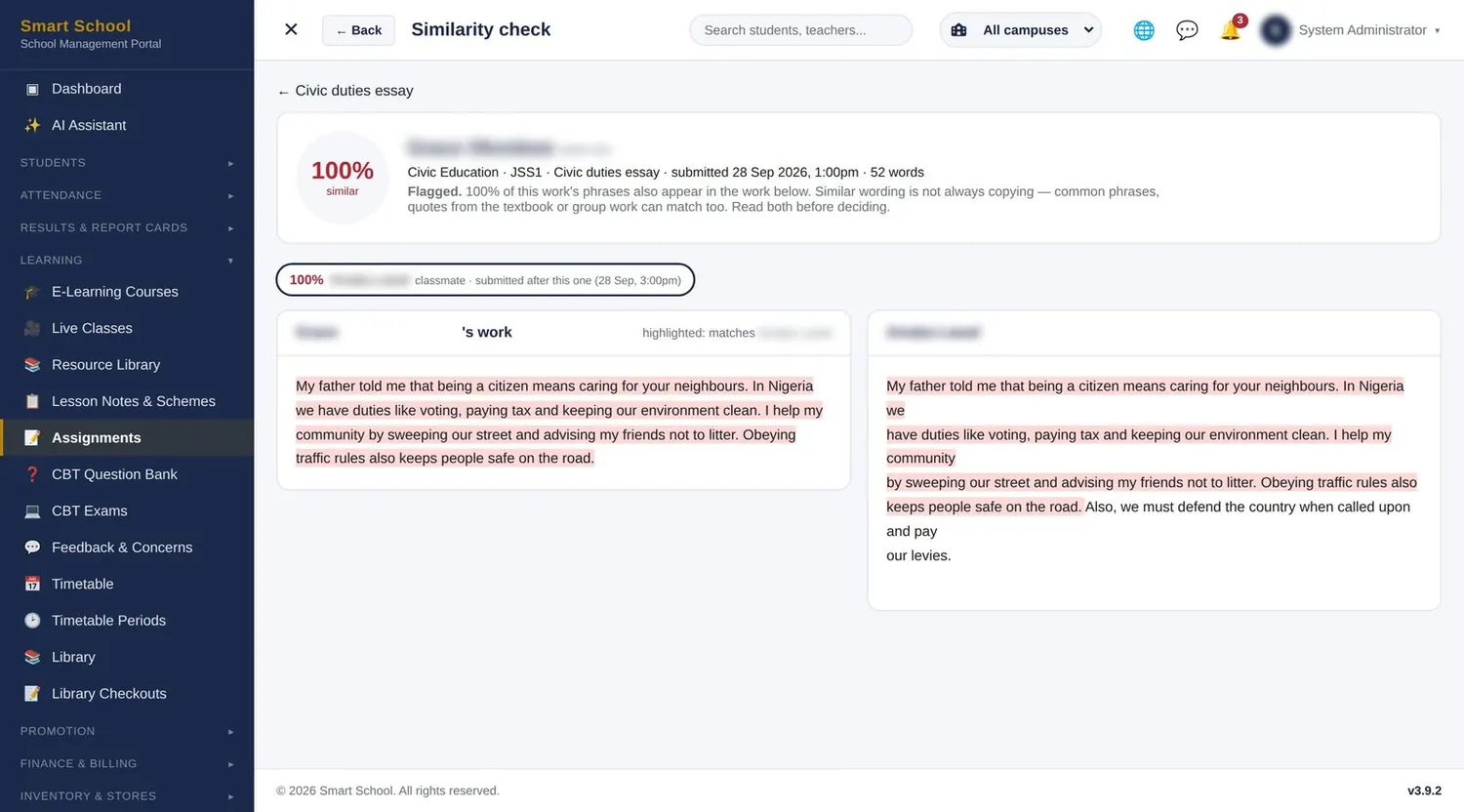
Library, assignments & plagiarism check screen
Library, assignments & plagiarism check second view
Learning

Library, assignments & plagiarism check

Every resource in one library. Every copied answer flagged.

  • Share notes, videos, past questions (school, BECE, WAEC) and textbooks by class and subject
  • Set assignments with due dates; typed and uploaded work is both checked
  • Every submission is compared with classmates’ work automatically
  • Side-by-side similarity view — flags are a prompt, the teacher decides
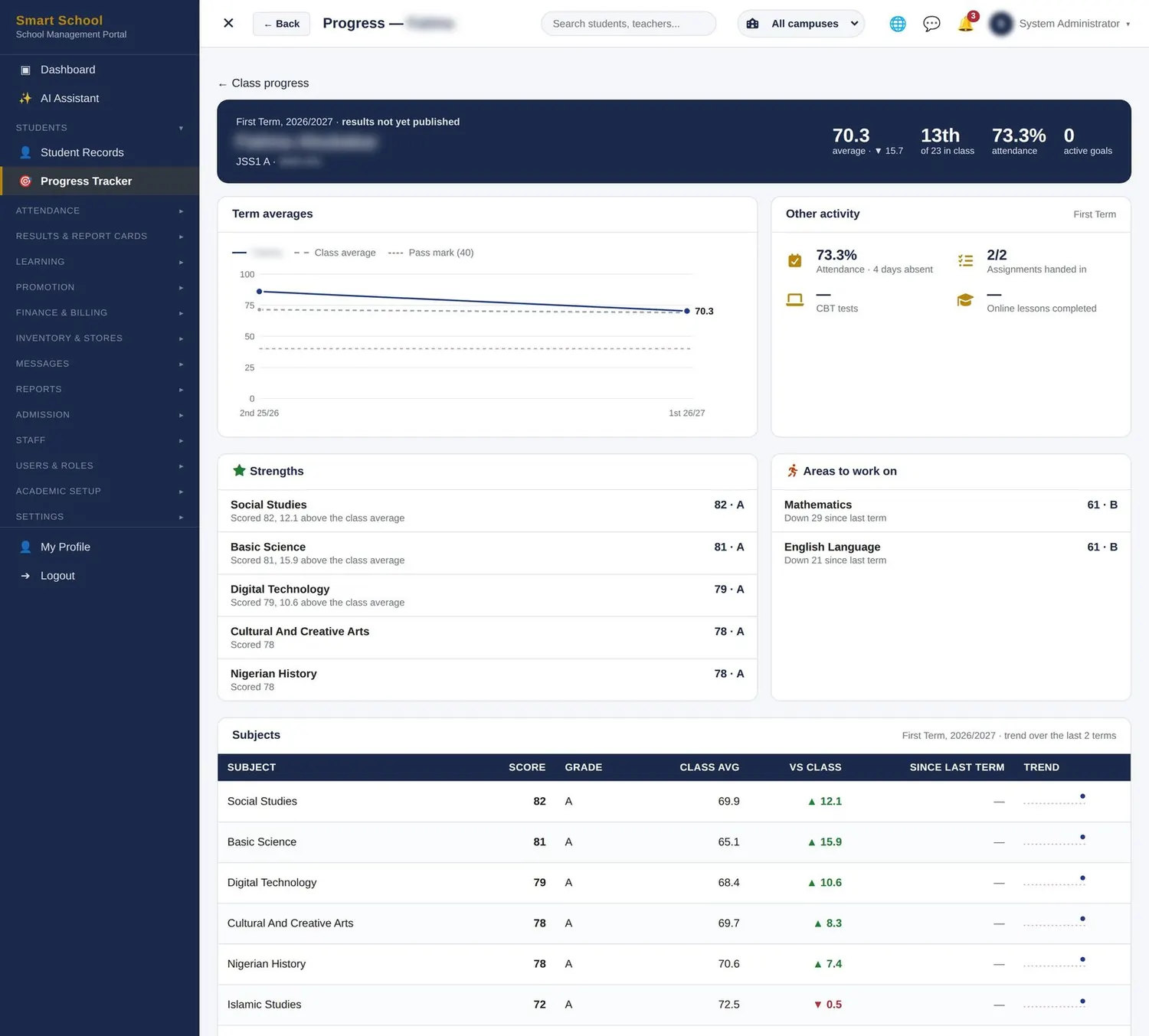
Student progress tracker screen
Learning

Student progress tracker

See which child is slipping before the report card does.

  • Strengths and weaknesses worked out from each subject against the class and last term
  • Goals — set a target with the student and follow it through the term
  • “Needs support” flags sorted to the top of the class list
  • Families see it too, so PTA conversations start from the same facts
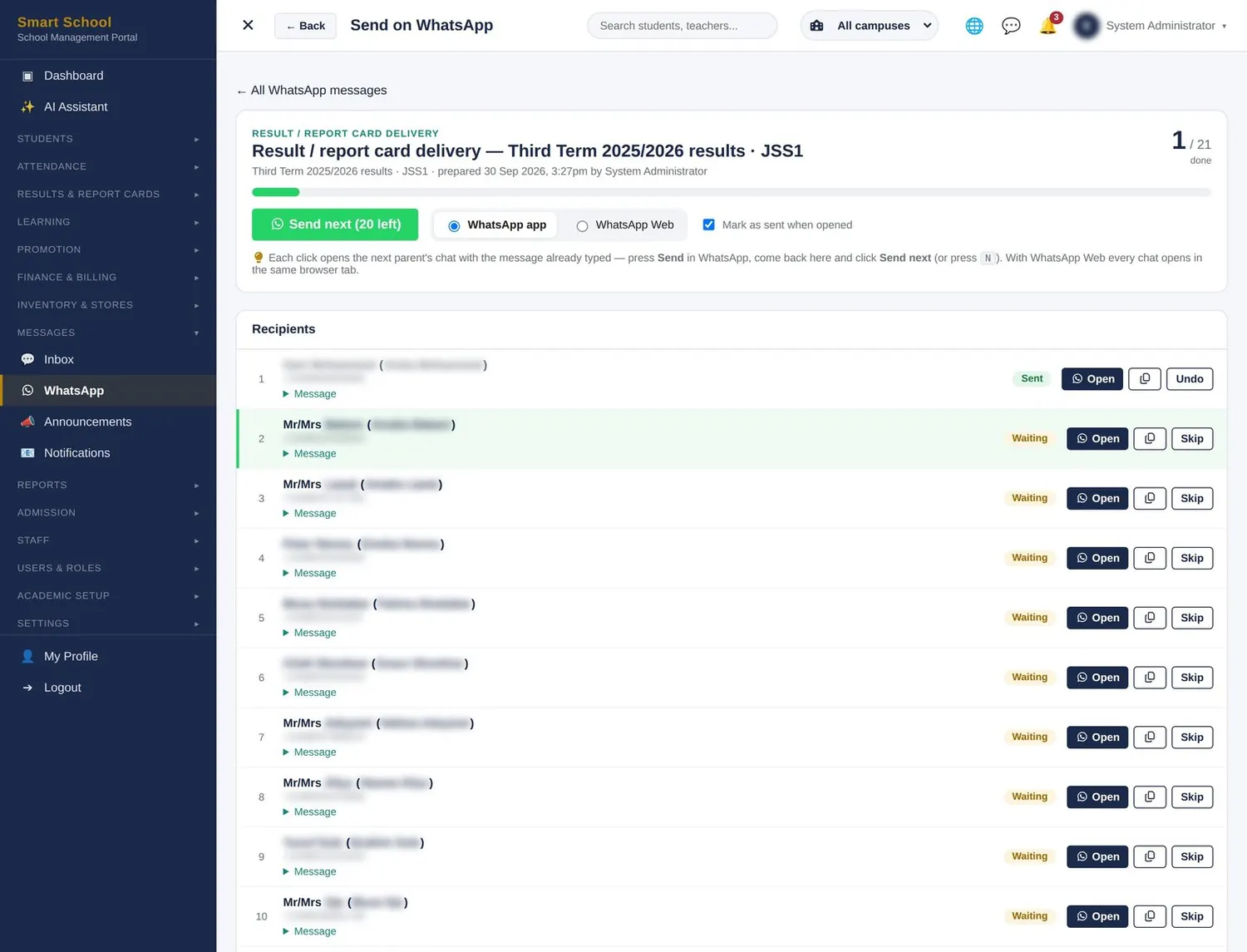
WhatsApp & messaging screen
Communication

WhatsApp & messaging

Reach every parent where they already are — WhatsApp.

  • Fee reminders, report-card links, absence alerts and notices — each message personal to the parent and child
  • Staff send from the school’s own WhatsApp: no bulk-SMS bills
  • Announcements that pop up for chosen roles and campuses
  • Inbox messaging between staff, parents and students
  • Email with editable templates; SMS through your provider
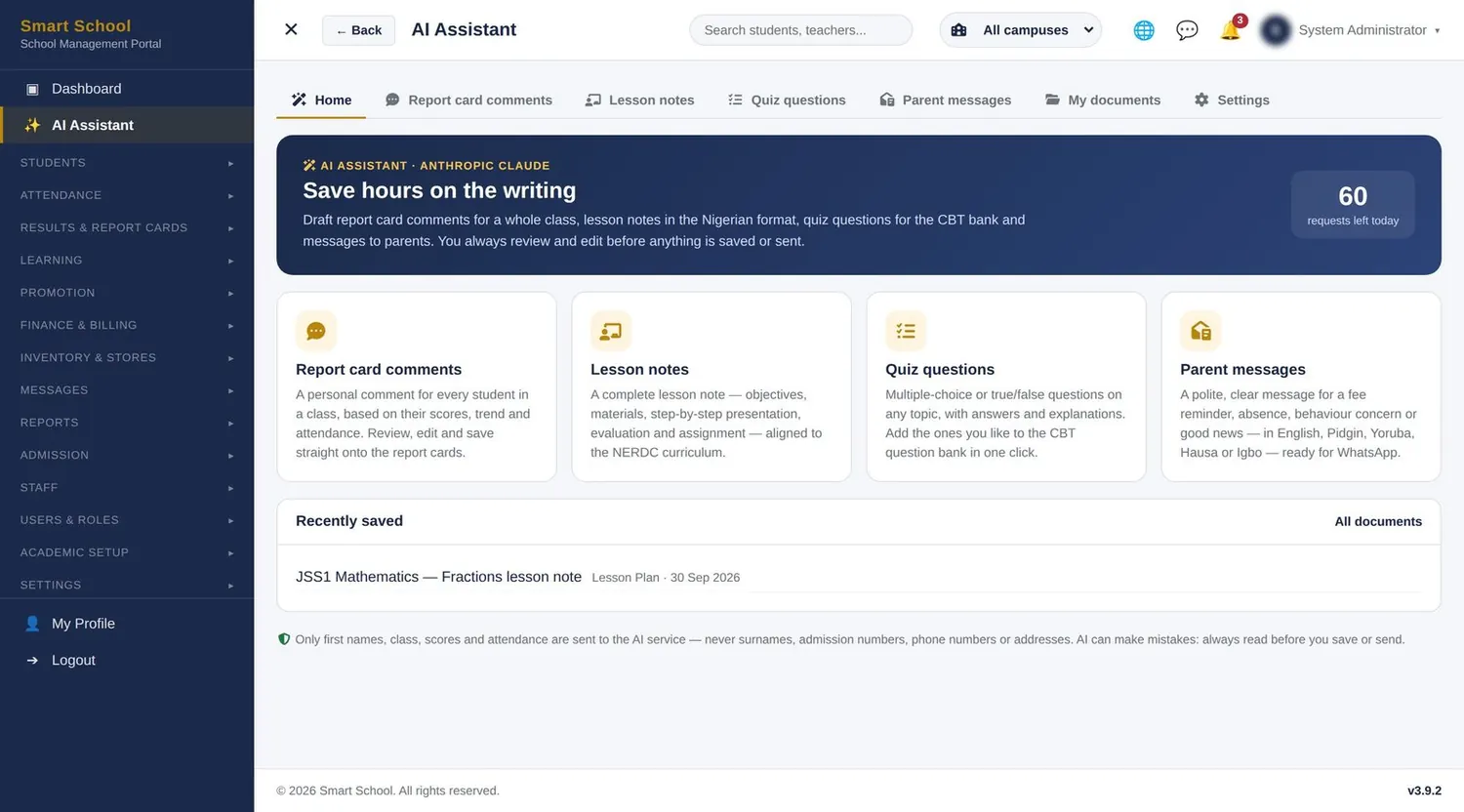
AI assistant for teachers screen
Communication

AI assistant for teachers

Give teachers back the hours they spend writing.

  • Drafts report-card comments, lesson notes, schemes of work, quiz questions and parent messages
  • Teachers always read, edit and approve before anything is saved or sent
  • Only first names, class, scores and attendance are ever sent — never surnames or phone numbers
  • Optional: choose Anthropic Claude or OpenAI with your own account key, or switch it off
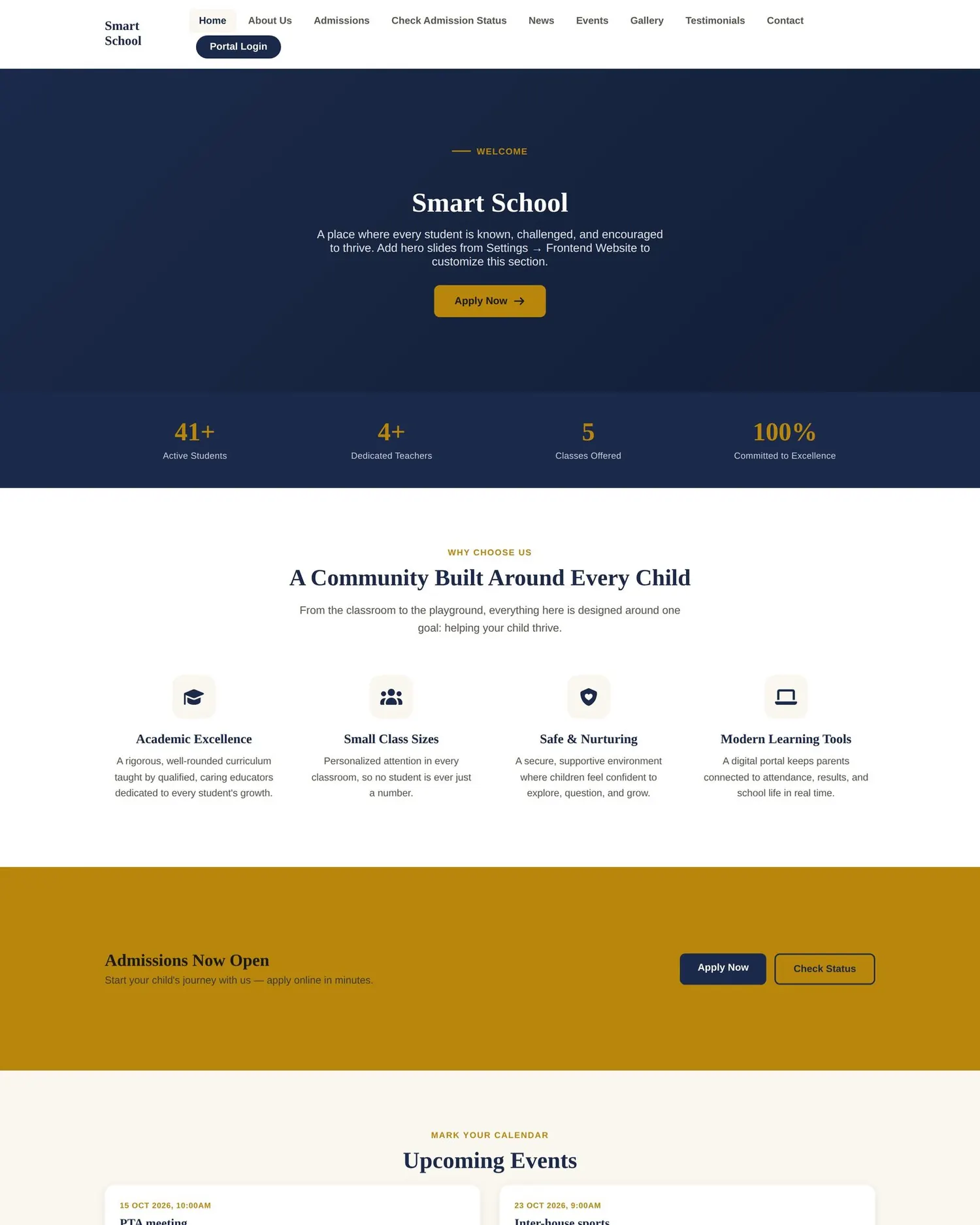
School website & mobile access screen
School website & mobile access second view
Communication

School website & mobile access

A public website included — and the portal in every pocket.

  • A school website you update yourself: slides, admissions call-to-action, news, events and gallery
  • Apply online and check admission status straight from the website
  • Installs like an app — parents add it to their home screen in two taps
  • Phone-friendly everywhere, with a bottom bar for Home, Messages, Alerts and Menu
Certificates & QR verification screen
Certificates & QR verification second view
Administration

Certificates & QR verification

Certificates no one can fake, checked by anyone in seconds.

  • Transcripts, completion and achievement certificates, testimonials — for one student or a whole class
  • Each carries a unique serial number and QR code in your own format
  • Universities and employers scan to confirm it is genuine — no letters or phone calls
  • Tamper check, and revoke a document when needed
Multi-campus, inventory & stores screen
Multi-campus, inventory & stores second view
Administration

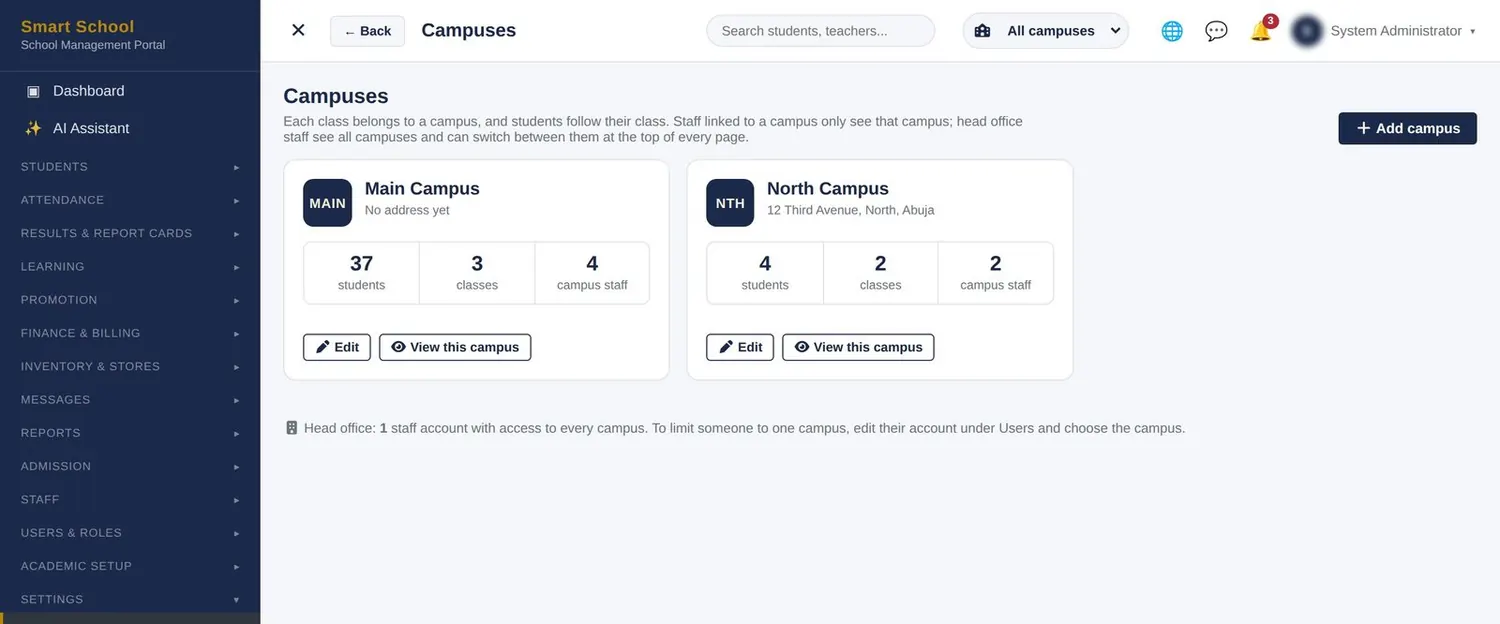
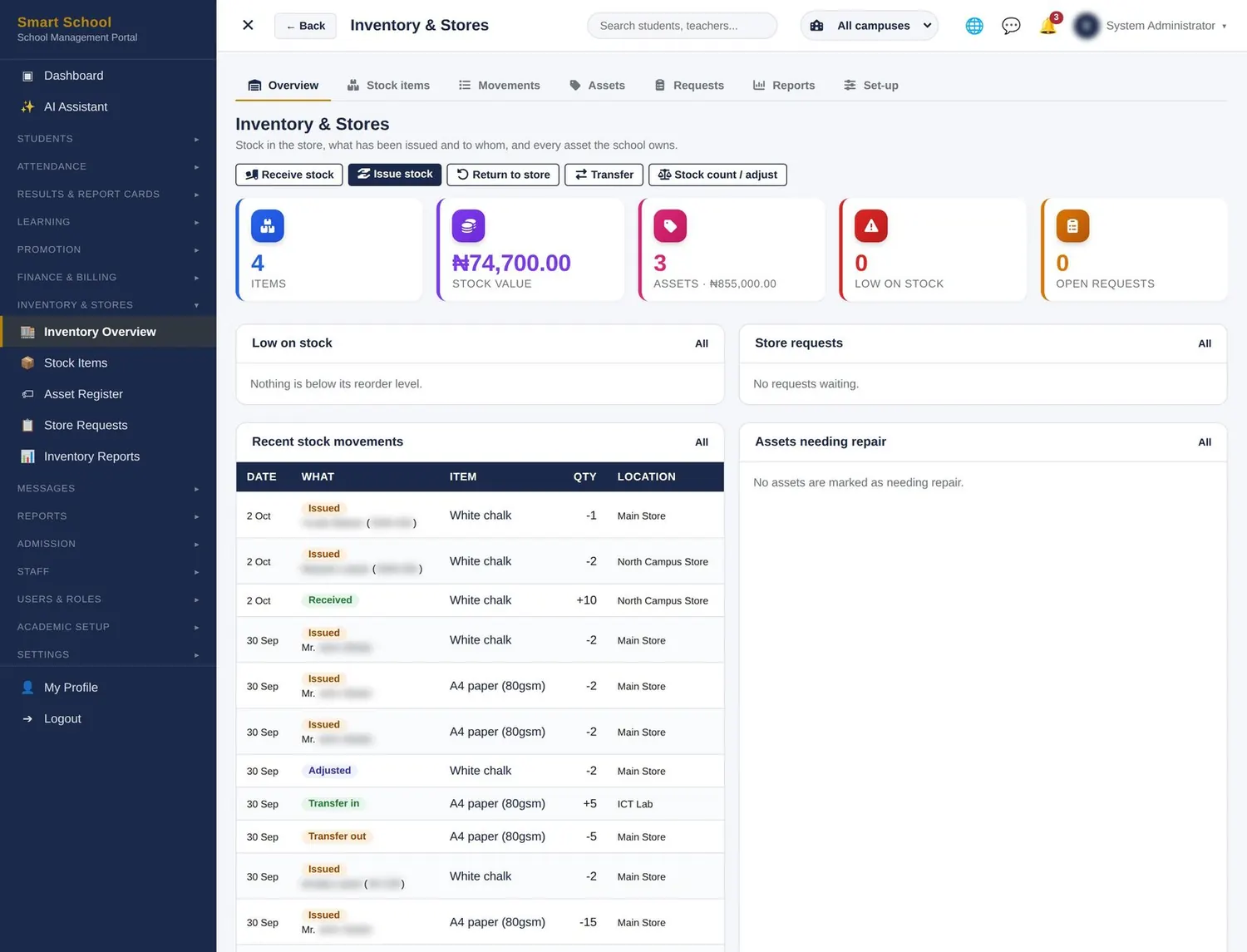
Multi-campus, inventory & stores

Grow to new branches. Keep every item accounted for.

  • Each campus works on its own students, classes, staff and fees; head office sees everything side by side
  • Bills, notices and WhatsApp batches can go to one campus or all
  • Asset register with printable labels; consumables by store location
  • Low-stock alerts, store requests and audit-ready reports
Security, roles & updates screen
Administration

Security, roles & updates

Your records are safe, private and always under your control.

  • Role-based permissions down to each action; teachers see their own classes by default
  • Activity log of who did what, and when
  • Results hidden until management publishes; payment-gateway secret keys are write-only
  • One-click database backup and CSV/Excel exports — the school owns its data
Getting started

We set it up with you, train your people and stay with you.

Switching systems should not disrupt a term. Our team does the heavy lifting, so your staff only need to learn their own part.

  1. 1Set-up

    Your portal, your brand

    We install the portal on your own web address, add your name, logo and colours, and configure sessions, terms, classes, arms, subjects, grading and fees with your team.

  2. 2Data

    Your existing records brought in

    Send us your student, parent and staff lists in Excel and we import them, create login accounts and link parents to their children.

  3. 3Training

    Hands-on sessions by role

    Administrators and bursars; teachers (attendance, scores, lesson notes, CBT, e-learning); and a short orientation for parents at a PTA meeting or by video.

  4. 4Go live

    Through your first result cycle

    We stay close through the first term — from the first register to the first report cards — so problems are solved the same day.

Phone, WhatsApp & email support

Talk to people who know the portal — a call or WhatsApp message reaches the team that built it.

Updates included

New features and improvements arrive as updates during your subscription at no extra cost.

Refresher training

A refresher at the start of each session for new staff.

Your own contact person

One named account officer who knows your school’s set-up.

Security, roles & updates

Your records are safe, private and always under your control.

School records are sensitive. Each person sees only what they should, every important action is recorded, and the school can take its data out whenever it wishes.

Access

  • Role-based permissions down to each action
  • Teachers see their own classes by default
  • Campus staff see only their campus
  • Accounts lock after repeated failed logins
  • Password reset by email

Accountability

  • Activity log of who did what, and when
  • Optional second approval for offline payments
  • Results hidden until management publishes
  • Payment-gateway secret keys are write-only
  • Every form protected against forged requests

Your data

  • The school owns its data, always
  • One-click database backup for the Super Admin
  • Export students, scores, fees and more to CSV or Excel
  • Photos and personal details never sent to the AI service
  • Served over HTTPS
Subscription plans

Simple pricing per student, per term.

You pay only for active students, billed each term. Choose the plan that fits today and move up whenever you are ready — your data comes with you.

Essential

For nursery and primary schools getting started.

Contact us for pricingper active student, per term

  • Admissions & student records
  • Attendance & timetable
  • Results, report cards & publishing
  • Fees, billing & online payments
  • Parent and student portal
  • Messaging, announcements & email
  • School website
Sign up your school

Premium

For school groups and larger schools.

Contact us for pricingper active student, per term

  • Everything in Standard, plus:
  • Multi-campus with head-office view
  • Inventory & stores
  • AI assistant set-up
  • Priority support
  • On-site training each session
Talk to sales

Every plan includes set-up on your own web address, data import, staff training and updates. Ask about a free live walk-through with your management team and annual-payment discounts.

Questions schools ask

Frequently asked questions

Do parents need to download an app?

No. The portal opens in any phone or computer browser, and parents can add it to their home screen so it opens like an app.

What about parents without smartphones?

Nothing is lost. Report cards still print, the bursar records cash and transfer payments, and messages can go by SMS.

Can we keep our own report card format?

Your name, logo, grading scale, CA and exam weighting, remarks and psychomotor items are all set to match how your school already works.

How do our current records get in?

Send us your existing lists in Excel. We import students, parents and staff and create their logins for you.

Can teachers see other classes’ results?

Not by default. Teachers work on their own classes and subjects; administrators decide who may see more.

Does fee money pass through Bitlite?

No. Online payments go straight into the school’s own Paystack, Flutterwave or Monnify account.

Who owns the data?

The school does. You can export your records to CSV or Excel and download a full database backup at any time.

Do we need internet in school?

Yes — it is an online portal. It is light on data and works on mobile internet, so teachers can enter scores from a phone.

We have more than one branch.

One subscription covers all campuses. Each campus works on its own records and head office sees everything.

What does the AI assistant cost?

It is optional. The school uses its own AI account key, sets a daily limit and pays the provider directly for what it uses.

How are new features delivered?

As update packages applied in a few clicks. Database changes run automatically and the result is recorded.

How soon can we start?

Most schools can go live quickly after sending their data, and starting mid-term is fine. Book a demo and we will agree a timeline with your team.

Talk to us

See your school on the portal.

Sign up today, or book a free demonstration for your management team. We will show the screens on this page live, with your classes and your questions.

Book a free demonstration

We’ll only use your details to arrange the demo.

Sign up your school Demo